Sélectionner une organisation
MuleSoft Database Connector Query Timeout Not Working as Expected on Oracle Database
Date de publication: Mar 31, 2026
Résolution
SYMPTOM
Query time is defined on the database connector as below:
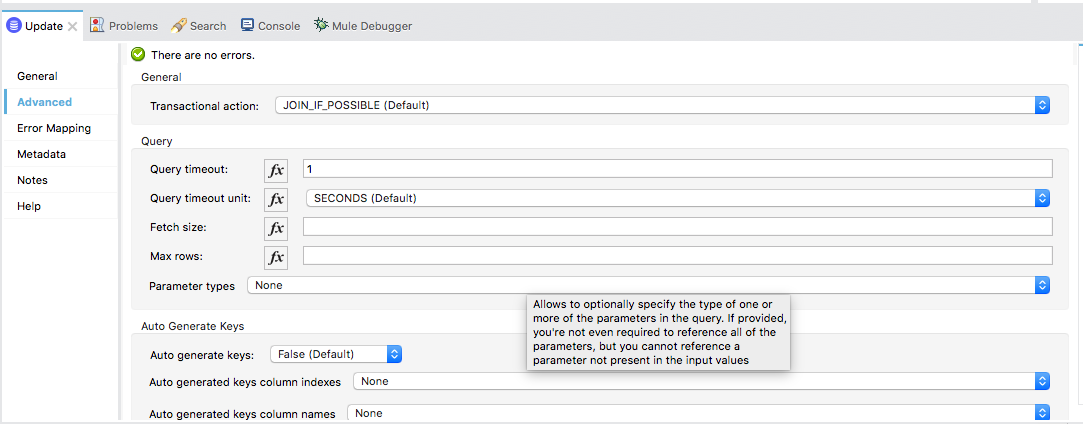
<db:select doc:name="Select" doc:id="d00d3c84-8b74-484f-8ab1-f818cfacb852" config-ref="Database_Config" queryTimeout="10">
<db:sql>select SAMPLE_AT from TEST_SAMPLE</db:sql>
</db:select>
The timeout set on any operation is not honored for any query running more than the defined timeout seconds.
CAUSE
It is an Oracle database driver issue.
SOLUTION
Pass the below JVM argument to the Mule Runtime:
-Doracle.net.disableOob=true
Refer: How can I set Mule and Java system properties at startup?
-Doracle.net.disableOob=true
Refer: How can I set Mule and Java system properties at startup?
ADDITIONAL INFORMATION
When calling an Oracle stored procedure, the query timeout setting is not honored even if the JVM argument "-Doracle.net.disableOob=true" is set. This could be a limitation of the Oracle database driver. The Database Connector provides the UI to configure the query timeout parameter for all types of databases. But the query timeout mechanism is not implemented by the Database Connector, but by the underlying database drivers. For more information about the behavior of the Oracle database driver, please reach out to Oracle Support.
The limitation can be tested and verified using the attached Java project:
- Update lines 5-7 in JDBCTimeout.java with your database URL, username and password
- Update line 22 with your stored procedure name
- Update line 23 with the query timeout in seconds
- Run the Java program and you will see that the database call does not timeout in line 26. Instead, it will take time to complete the call and print the actual elapsed time in line 28.
Disclaimer: This article involves products and technologies that do not form part of the MuleSoft product set. Technical assistance for such products is limited to this article.
Attachments
oracletest.zip
Numéro d’article de la base de connaissances
001120726
Cet article a-t-il résolu votre problème ?
Dites-nous ce que nous pouvons améliorer !
