組織を選択
Salesforce Connector | Error: "Invalid Session ID found in SessionHeader: Illegal Session. Session not found, missing session hash"
公開日: Feb 24, 2025
解決策
SYMPTOM
The below error is received in the logs intermittently while using the Salesforce Connector in Mule 4.
08:54:11.313 03/29/2021 Worker-0 [MuleRuntime].uber.540: [api-sf-].get:\all.BLOCKING @123456 WARN
event:cccccc-abcdef-34567-12345-aaa Couldn't execute action over partner client because an unexpected error has occurred. An exception will be thrown.
[UnexpectedErrorFault [ApiFault exceptionCode='INVALID_SESSION_ID'
exceptionMessage='Invalid Session ID found in SessionHeader: Illegal Session. Session not found, missing session hash: ABCDEFG+=
This error usually occurs after a session expires or a user logs out. Decoder: DataInDbSessionKeyDecoder'
extendedErrorDetails='{[0]}'
]
]

at sun.reflect.NativeConstructorAccessorImpl.newInstance0(Native Method)
at sun.reflect.NativeConstructorAccessorImpl.newInstance(NativeConstructorAccessorImpl.java:62)
at sun.reflect.DelegatingConstructorAccessorImpl.newInstance(DelegatingConstructorAccessorImpl.java:45)
at java.lang.reflect.Constructor.newInstance(Constructor.java:423)
at java.lang.Class.newInstance(Class.java:442)
at com.sforce.ws.bind.TypeMapper.readSingle(TypeMapper.java:721)
at com.sforce.ws.bind.TypeMapper.readObject(TypeMapper.java:593)
at com.sforce.ws.transport.SoapConnection.parseDetail(SoapConnection.java:250)
at com.sforce.ws.transport.SoapConnection.createException(SoapConnection.java:224)
at com.sforce.ws.transport.SoapConnection.receive(SoapConnection.java:163)
at com.sforce.ws.transport.SoapConnection.send(SoapConnection.java:108)
at com.sforce.soap.partner.PartnerConnection.query(PartnerConnection.java:1196)
at org.mule.extension.salesforce.internal.service.CoreServiceImpl.lambda$query$27(CoreServiceImpl.java:541)
CAUSE
Salesforce by default sets all organizations to log out of the sessions after 2 hours. However, there are a few issues on the Mulesoft side that have this same stack trace. Here is a list:
9.x:
When using the SFDC Connector the session is timing out
OAuth 2.0:
"Invalid Session ID" Error with OAuth 2.0 connection to Salesforce
SOLUTION
MuleSoft side:
- Make sure to use the latest version of the Salesforce connector by referring to this Release Notes.
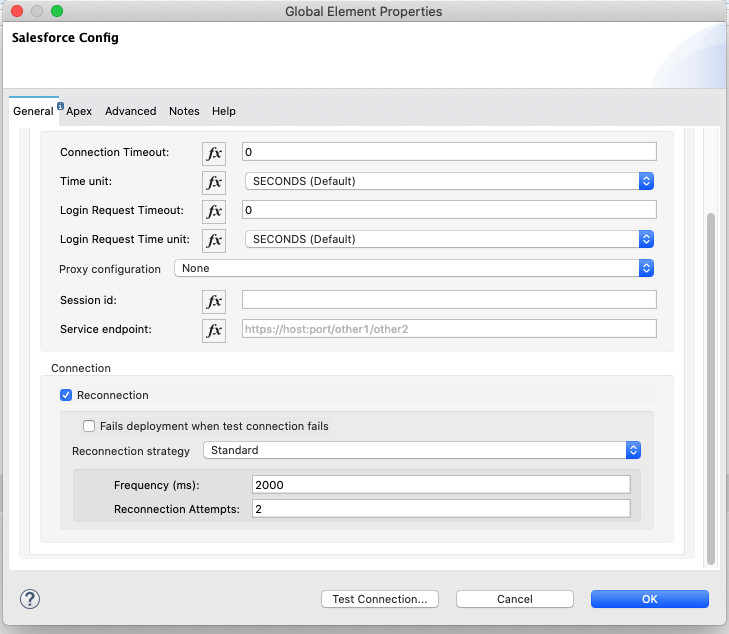
- Add a reconnection strategy:
Mule generic docs link
Salesforce Connector docs link
Here is a screenshot of configuring this on the Salesforce connector.
Please note that after applying the Reconnection Strategy, you might continue to receive the warning but the connector will perform a reconnection so there would be no impact on the flow.
Salesforce side:
**Warning: These changes will take effect org-wide. Please test this out on a lower environment first.
1. Login to your Salesforce organization.
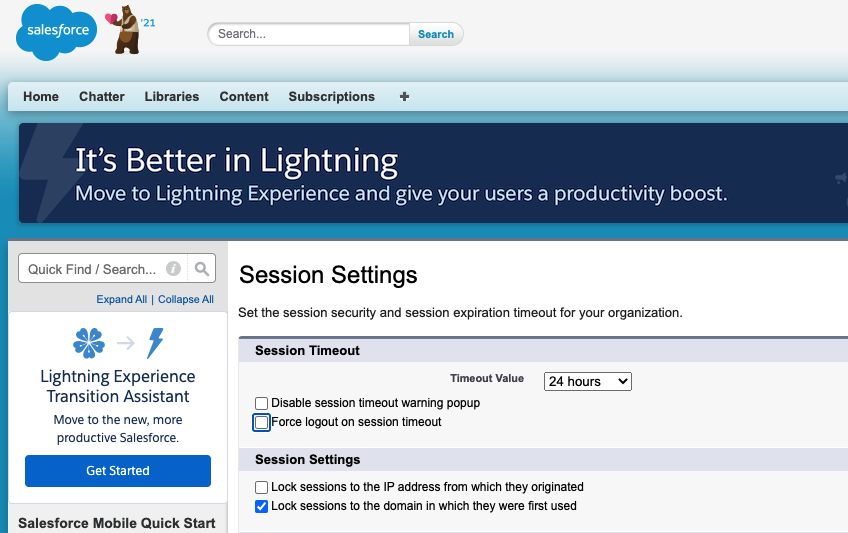
2. Under "Setup", search for "Session Settings".
3. Uncheck the option "Force logout on session timeout" and set the "Timeout Value" to 24 hours:
4. Click "Save".
ナレッジ記事番号
001121547
この記事で問題は解決されましたか?
ご意見をお待ちしております。
