조직 선택
Salesforce Connector Test Connection Fails With Invalid Security Token
게시 일자: Mar 2, 2024
솔루션
SYMPTOM
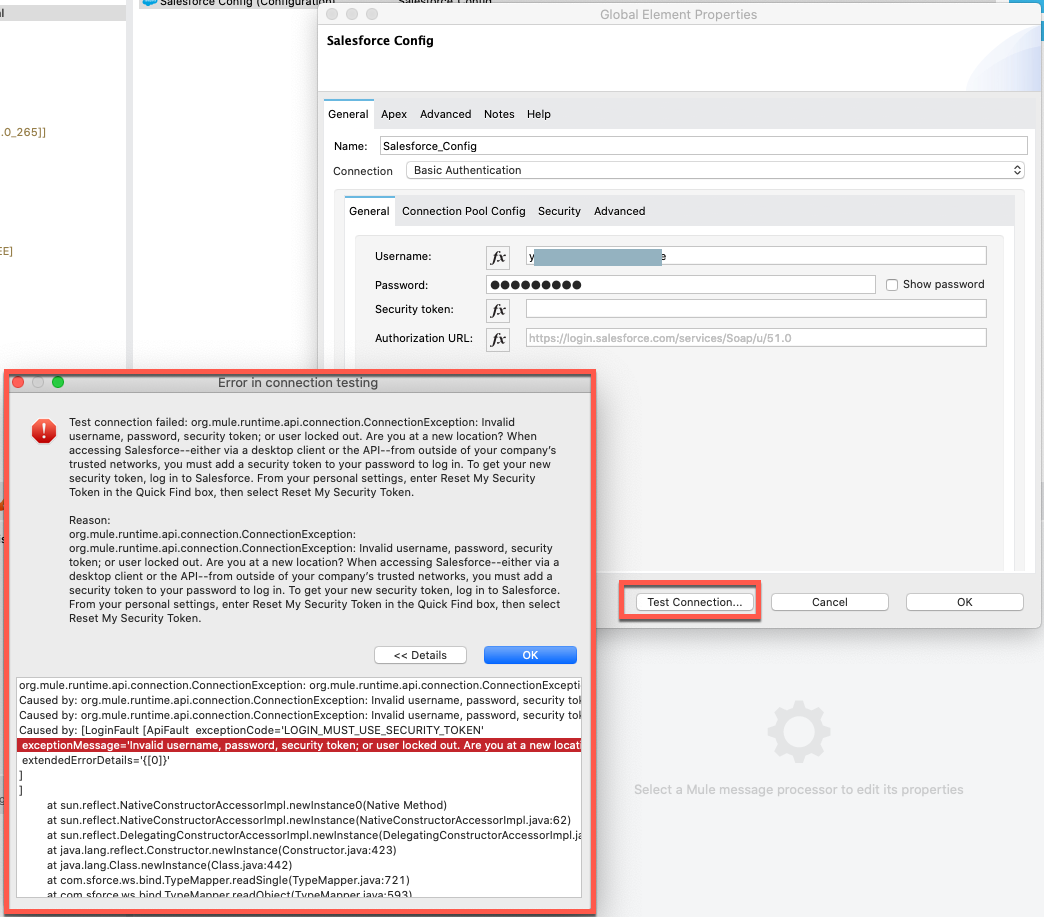
I am using the correct Salesforce username and password, but Salesforce Connector Test Connection fails with Invalid Security Token.Sample Error message)
org.mule.runtime.api.connection.ConnectionException: org.mule.runtime.api.connection.ConnectionException: Invalid username, password, security token; or user locked out. Are you at a new location? When accessing Salesforce--either via a desktop client or the API--from outside of your company’s trusted networks, you must add a security token to your password to log in. To get your new security token, log in to Salesforce. From your personal settings, enter Reset My Security Token in the Quick Find box, then select Reset My Security Token.
  org.mule.runtime.api.connection.ConnectionException: org.mule.runtime.api.connection.ConnectionException: Invalid username, password, security token; or user locked out. Are you at a new location? When accessing Salesforce--either via a desktop client or the API--from outside of your company’s trusted networks, you must add a security token to your password to log in. To get your new security token, log in to Salesforce. From your personal settings, enter Reset My Security Token in the Quick Find box, then select Reset My Security Token.
  Caused by: org.mule.runtime.api.connection.ConnectionException: Invalid username, password, security token; or user locked out. Are you at a new location? When accessing Salesforce--either via a desktop client or the API--from outside of your company’s trusted networks, you must add a security token to your password to log in. To get your new security token, log in to Salesforce. From your personal settings, enter Reset My Security Token in the Quick Find box, then select Reset My Security Token.
  Caused by: org.mule.runtime.api.connection.ConnectionException: Invalid username, password, security token; or user locked out. Are you at a new location? When accessing Salesforce--either via a desktop client or the API--from outside of your company’s trusted networks, you must add a security token to your password to log in. To get your new security token, log in to Salesforce. From your personal settings, enter Reset My Security Token in the Quick Find box, then select Reset My Security Token.
  Caused by: [LoginFault [ApiFault  exceptionCode='LOGIN_MUST_USE_SECURITY_TOKEN'
   exceptionMessage='Invalid username, password, security token; or user locked out. Are you at a new location? When accessing Salesforce--either via a desktop client or the API--from outside of your company’s trusted networks, you must add a security token to your password to log in. To get your new security token, log in to Salesforce. From your personal settings, enter Reset My Security Token in the Quick Find box, then select Reset My Security Token.'
   extendedErrorDetails='{[0]}'
  ]
  ]
  	at sun.reflect.NativeConstructorAccessorImpl.newInstance0(Native Method)
  	at sun.reflect.NativeConstructorAccessorImpl.newInstance(NativeConstructorAccessorImpl.java:62)
  	at sun.reflect.DelegatingConstructorAccessorImpl.newInstance(DelegatingConstructorAccessorImpl.java:45)
  	at java.lang.reflect.Constructor.newInstance(Constructor.java:423)
  	at java.lang.Class.newInstance(Class.java:442)
  	at com.sforce.ws.bind.TypeMapper.readSingle(TypeMapper.java:721)
  	at com.sforce.ws.bind.TypeMapper.readObject(TypeMapper.java:593)
  	at com.sforce.ws.transport.SoapConnection.parseDetail(SoapConnection.java:250)
  	at com.sforce.ws.transport.SoapConnection.createException(SoapConnection.java:224)
  	at com.sforce.ws.transport.SoapConnection.receive(SoapConnection.java:163)
  	at com.sforce.ws.transport.SoapConnection.send(SoapConnection.java:108)
  	at com.sforce.soap.partner.PartnerConnection.login(PartnerConnection.java:817)
  	at com.sforce.soap.partner.PartnerConnection.<init>(PartnerConnection.java:426)
  	at com.sforce.soap.partner.Connector.newConnection(Connector.java:28)
  	at org.mule.extension.salesforce.internal.connection.pooling.ConnectionPool.createPartnerConnection(ConnectionPool.java:143)
  	at org.mule.extension.salesforce.internal.connection.pooling.PartnerConnectionPool.create(PartnerConnectionPool.java:38)
...
CAUSE
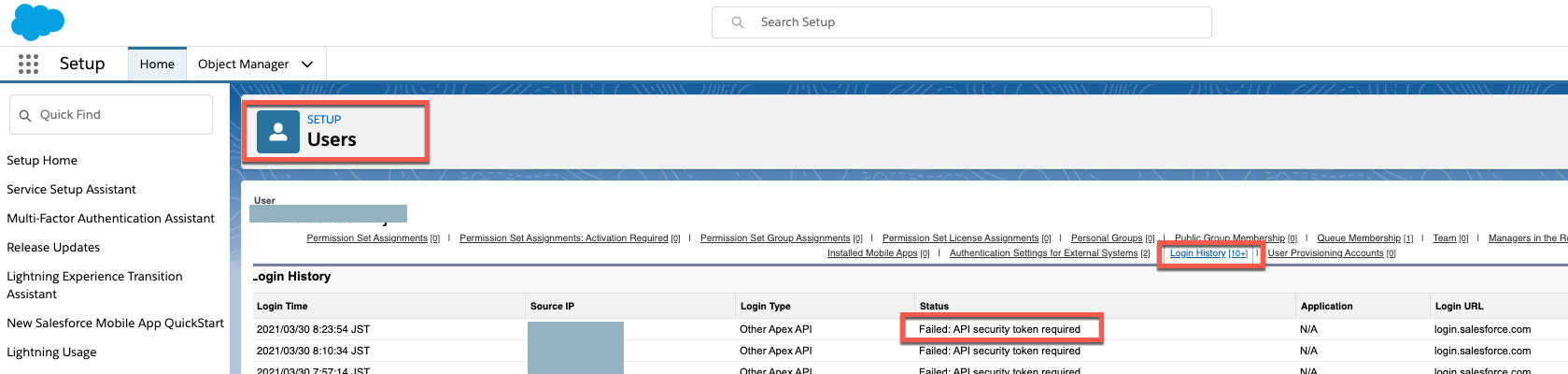
As described in the Salesforce document Reset Your Security Token, Security Token is required when connecting Salesforce via API.When you access Salesforce from an IP address that’s outside your company’s trusted IP range using a desktop client or the API, you need a security token to log in.You can confirm the connection error is caused by the missing/wrong security token by Login Salesforce => Setup => Users => Login History. You will see "Failed: API security token required".
SOLUTION
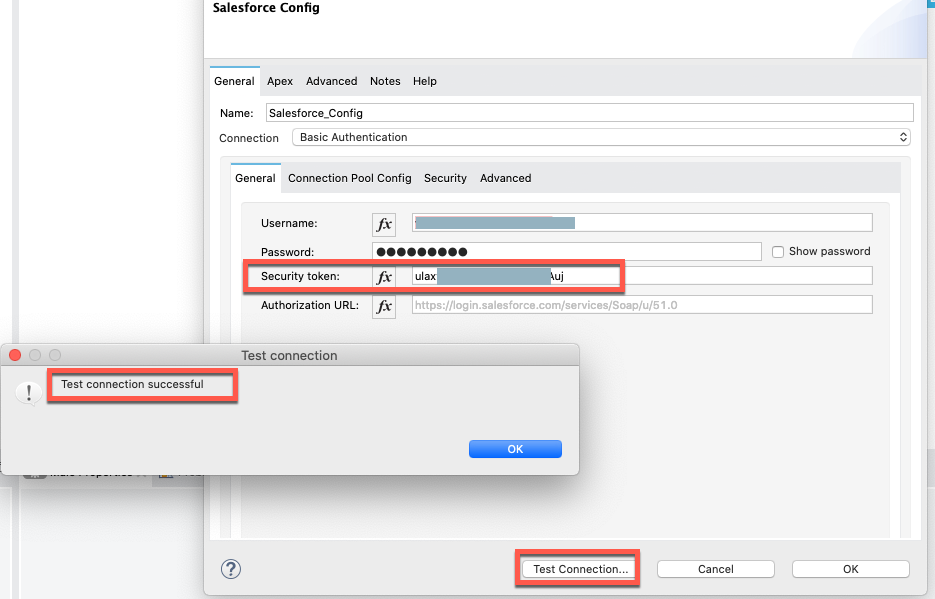
You can solve this by either one of the following steps.(A) Set Security Token in the Salesforce config, then the connection will be successful.
(B) If you do not know the Security Token for the Salesforce user, get a new token by following the steps in the Salesforce document Reset Your Security Token
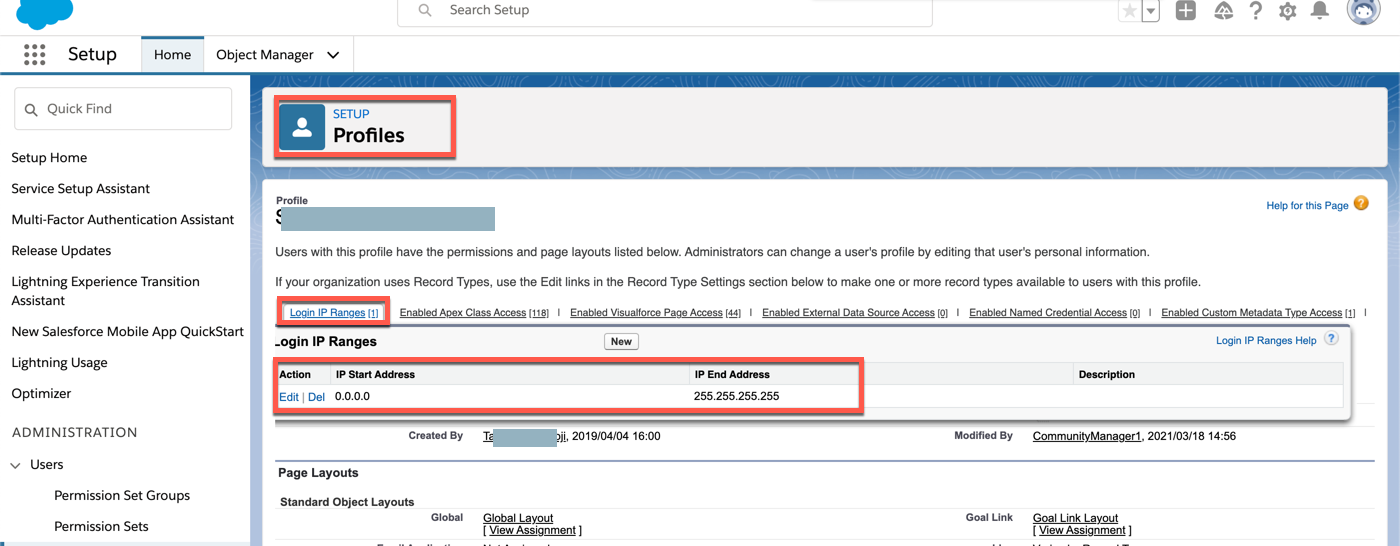
(C) You will be able to connect Salesforce without using Security Token, if you include your Client IP address(in this case, where the MuleRuntime is running) in the Salesforce user's Profile as "Login IP Ranges". This is written in the Salesforce document Unable to see the Reset Security Token option
The following example is allowing any IP addresses by setting 0.0.0.0 to 255.255.255.255. You can set limited IP Ranges as well.
Knowledge 기사 번호
001121558
이 기사를 통해 문제를 해결했습니까?
개선을 위한 의견을 보내주세요.
