組織を選択
Sign PDF file with SHA256 using Dataweave
公開日: Oct 14, 2024
解決策
DESCRIPTION
This article describes how to encrypt a PDF file with SHA256 using Dataweave.
STEPS TO FOLLOW
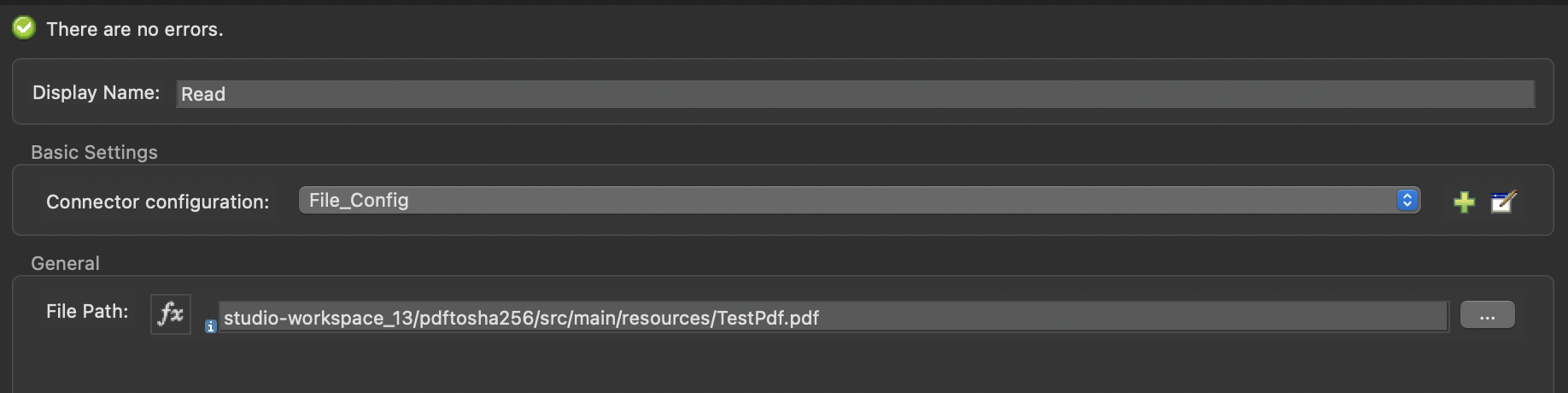
1) Add a read module to your application and configure it with the PDF file path.
2) Add a transforming message with the following script.
%dw 2.0
import dw::Crypto
output application/json
var paylodTo = write(payload, "application/json")
---
Crypto::hashWith(paylodTo, "SHA-256")
- import dw::Crypto = Library needed to use the crypto module
- var paylodTo = write(payload, "application/json") = Variable created to first write the payload in JSON format. (Returns a String or Binary with the serialized representation of the value in the specified format.
- Crypto::hashWith(paylodTo, "SHA-256") = hash the payload with "SHA-256"
"\ufffd\ufffd\u001fxp\ufffdK&y\ufffd\u0010\ufffd\u000f\ufffd\u00030M\ufffd\ufffd\ufffdG\ufffdN\ufffd ^\\\ufffd\ufffd\ufffd\ufffd"
ナレッジ記事番号
001121694
この記事で問題は解決されましたか?
ご意見をお待ちしております。
