Valitse organisaatio
SFTP Connector | Getting An Error "Exception was found writing to file 'location' " while writing a file to SFTP client
Julkaisupäivä: Mar 2, 2024
Ratkaisu
SYMPTOM
You are using SFTP connector - Write operation and are getting an error "Exception was found writing to file 'location' " while writing a file to SFTP client.
On enabling the debug logs as per the article "How to enable DEBUG logging for FTP, SFTP and FTPS modules" you see the below error in the logs.
DEBUG 2022-08-31 16:26:50,912 [[MuleRuntime].uber.07: [app-name].app-nameFlow.BLOCKING @6a971f86] [processor: app-nameFlow/processors/2; event: 9d378271-291b-11ed-9557-147dda423de0] org.mule.extension.sftp.internal.connection.SftpClient: Attempting to cwd to: /
ERROR 2022-08-31 16:26:51,510 [[MuleRuntime].uber.07: [app-name].app-nameFlow.BLOCKING @6a971f86] [processor: app-nameFlow/processors/2; event: 9d378271-291b-11ed-9557-147dda423de0] org.mule.runtime.core.internal.exception.OnErrorPropagateHandler:
********************************************************************************
Message : Exception was found writing to file '/test-transactions/Revenue_SF_WD_12-12-2022T00:00:00.csv'
Element : app-nameFlow/processors/2 @ app-name:app-name.xml:43
Element DSL : <sftp:write doc:id="a3528193-8df4-4343-9052-44c874ccec9d" config-ref="SFTP_Config" path="#['test-transactions/Revenue_SF_WD_' ++ vars.endDate ++ '.csv']"></sftp:write>
Error type : MULE:UNKNOWN
FlowStack : at app-nameFlow(app-nameFlow/processors/2 @ app-name:app-name.xml:43)
--------------------------------------------------------------------------------
Root Exception stack trace:
2: No such file
at com.jcraft.jsch.ChannelSftp.throwStatusError(ChannelSftp.java:2873)
at com.jcraft.jsch.ChannelSftp._put(ChannelSftp.java:594)
at com.jcraft.jsch.ChannelSftp.put(ChannelSftp.java:540)
at com.jcraft.jsch.ChannelSftp.put(ChannelSftp.java:495)
at org.mule.extension.sftp.internal.connection.SftpClient.write(SftpClient.java:344)
at org.mule.extension.sftp.internal.command.SftpWriteCommand.write(SftpWriteCommand.java:75)
at org.mule.extension.file.common.api.AbstractFileSystem.write(AbstractFileSystem.java:151)
at org.mule.extension.sftp.internal.SftpOperations.write(SftpOperations.java:195)
at org.mule.extension.sftp.internal.SftpOperations$write$MethodComponentExecutor_sf_wd_rev_sftp_integration.execute(Unknown Source)
at org.mule.runtime.module.extension.internal.runtime.execution.GeneratedMethodComponentExecutor.execute(GeneratedMethodComponentExecutor.java:98)
at org.mule.runtime.module.extension.internal.runtime.execution.CompletableMethodOperationExecutor.doExecute(CompletableMethodOperationExecutor.java:29)
at org.mule.runtime.module.extension.internal.runtime.execution.AbstractCompletableMethodOperationExecutor.execute(AbstractCompletableMethodOperationExecutor.java:63)
at org.mule.runtime.module.extension.internal.runtime.operation.DefaultExecutionMediator.executeCommand(DefaultExecutionMediator.java:233)
at org.mule.runtime.module.extension.internal.runtime.operation.DefaultExecutionMediator.executeWithInterceptors(DefaultExecutionMediator.java:217)
at org.mule.runtime.module.extension.internal.runtime.operation.DefaultExecutionMediator.lambda$execute$1(DefaultExecutionMediator.java:136)
at org.mule.runtime.module.extension.internal.runtime.operation.DefaultExecutionMediator.lambda$new$0(DefaultExecutionMediator.java:73)
at org.mule.runtime.module.extension.internal.runtime.operation.DefaultExecutionMediator.withExecutionTemplate(DefaultExecutionMediator.java:312)
at org.mule.runtime.module.extension.internal.runtime.operation.DefaultExecutionMediator.execute(DefaultExecutionMediator.java:135)
at org.mule.runtime.module.extension.internal.runtime.operation.ComponentMessageProcessor.executeOperation(ComponentMessageProcessor.java:582)
at org.mule.runtime.module.extension.internal.runtime.operation.ComponentMessageProcessor.prepareAndExecuteOperation(ComponentMessageProcessor.java:808)
at org.mule.runtime.module.extension.internal.runtime.operation.ComponentMessageProcessor.lambda$onEventSynchronous$16(ComponentMessageProcessor.java:484)
at org.mule.runtime.module.extension.internal.runtime.operation.ComponentMessageProcessor.onEventSynchronous(ComponentMessageProcessor.java:491)
at org.mule.runtime.module.extension.internal.runtime.operation.ComponentMessageProcessor.lambda$null$6(ComponentMessageProcessor.java:400)
at reactor.core.* (3 elements filtered from stack; set debug level logging or '-Dmule.verbose.exceptions=true' for everything)(Unknown Source)
at org.mule.runtime.core.privileged.processor.chain.* (2 elements filtered from stack; set debug level logging or '-Dmule.verbose.exceptions=true' for everything)(Unknown Source)
at reactor.core.* (6 elements filtered from stack; set debug level logging or '-Dmule.verbose.exceptions=true' for everything)(Unknown Source)
at java.util.concurrent.FutureTask.run(FutureTask.java:266)
at org.mule.service.scheduler.internal.AbstractRunnableFutureDecorator.doRun(AbstractRunnableFutureDecorator.java:151)
at org.mule.service.scheduler.internal.RunnableFutureDecorator.run(RunnableFutureDecorator.java:54)
at java.util.concurrent.ThreadPoolExecutor.runWorker(ThreadPoolExecutor.java:1149)
at java.util.concurrent.ThreadPoolExecutor$Worker.run(ThreadPoolExecutor.java:624)
at java.lang.Thread.run(Thread.java:750)
********************************************************************************
CAUSE
One of the possible scenarios where this issue could be happening is, that your SFTP client doesn't accept the characters such as \ / : * ? " < > in the folder name or file names as shown in the image below.
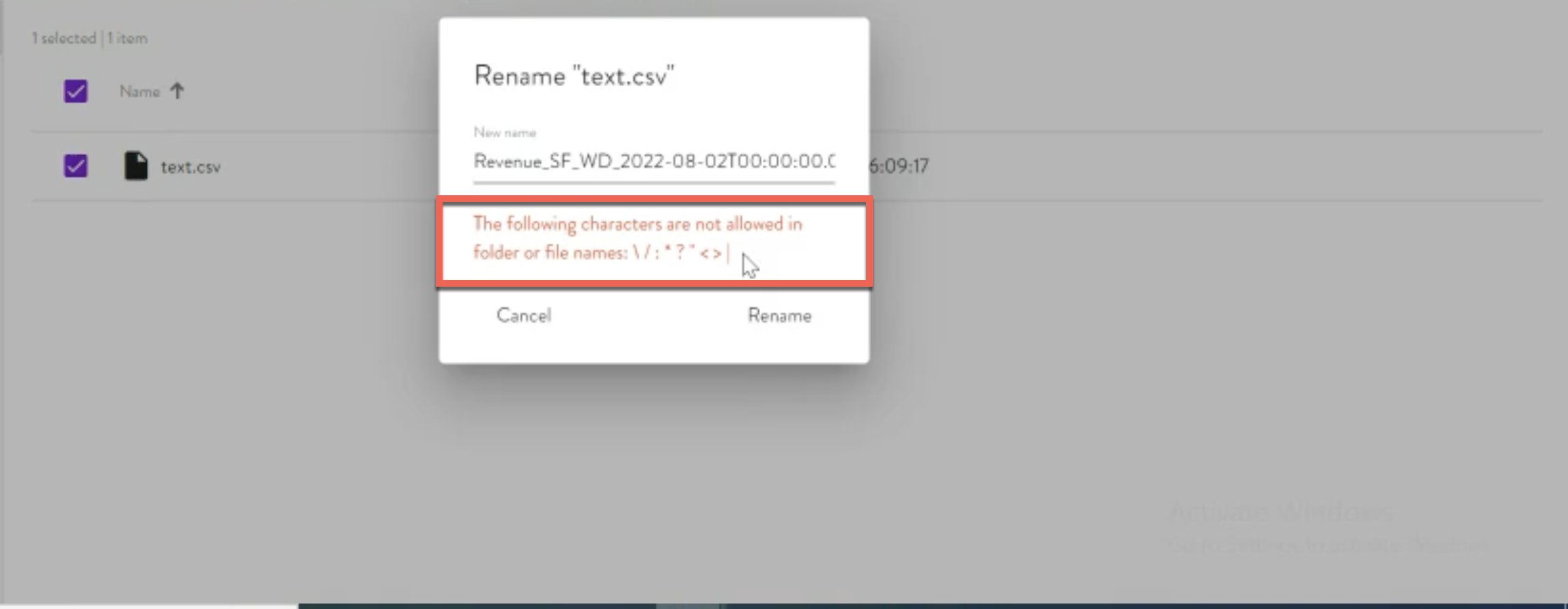
You can validate this by attempting to create /rename a file manually with the same name as you intend to create using the MuleSoft SFTP connector - write operation and if you are not able to create the file with that name manually outside MuleSoft, it's intended that you will not be able to create a file with the same title using MuleSoft SFTP connector in your SFTP client.
SOLUTION
Kindly get in touch with your SFTP vendor so that they could allow characters such as \ / : * ? " < > in the folder name or file names so that you can create the folder or file names that consist of any of the prohibited characters such as \ / : * ? " < > outside MuleSoft and using MuleSoft
Disclaimer: This article involves products and technologies which do not form part of the MuleSoft product set. Technical assistance for such products is limited to this article.
Knowledge-artikkelin numero
001121846
Ratkaisiko tämä artikkeli ongelmasi?
Anna palautetta, jotta voimme kehittyä!
