조직 선택
Application Deployment Failed with Encrypted Secure Properties Due to Incorrect Encrypt Algorithm Configuration
게시 일자: Mar 2, 2024
솔루션
SYMPTOM
You may see different errors according to the values encryption in the secure configuration property file. If the file contains both encrypted and clear text properties. It throws out error "Given final block not properly padded. Such issues can arise if a bad key is used during decryption"[07-13 03:58:07.316] ERROR DefaultMuleApplication [WrapperListener_start_runner] [event: ]: java.lang.RuntimeException: org.mule.encryption.exception.MuleEncryptionException: Could not encrypt or decrypt the data. javax.crypto.BadPaddingException: Given final block not properly padded. Such issues can arise if a bad key is used during decryption. at com.sun.crypto.provider.CipherCore.unpad(CipherCore.java:975) ~[sunjce_provider.jar:1.8.0_212] at com.sun.crypto.provider.CipherCore.fillOutputBuffer(CipherCore.java:1056) ~[sunjce_provider.jar:1.8.0_212] ...If all the properties are encrypted, it shows the "IllegalBlockSizeException: Input length must be multiple of 16 when decrypting with padded cipher"
[07-13 04:50:48.109] ERROR DefaultMuleApplication [WrapperListener_start_runner] [event: ]: java.lang.RuntimeException: org.mule.encryption.exception.MuleEncryptionException: Could not encrypt or decrypt the data.
javax.crypto.IllegalBlockSizeException: Input length must be multiple of 16 when decrypting with padded cipher
	at com.sun.crypto.provider.CipherCore.prepareInputBuffer(CipherCore.java:1005) ~[sunjce_provider.jar:1.8.0_212]
...
CAUSE
1. The property is encrypted with Blowfish> java -cp secure-properties-tool.jar com.mulesoft.tools.SecurePropertiesTool string encrypt Blowfish CBC DSwwm2ntJO5AmKuhYV7cgmTosSxxxxxx "Hello World" djr77NuUxpFyvmf7OphW1Q==However, in the "Secure Properties Config" of the application, the Algorithm field was set with the default value "AES" in Secure Properties Configuration
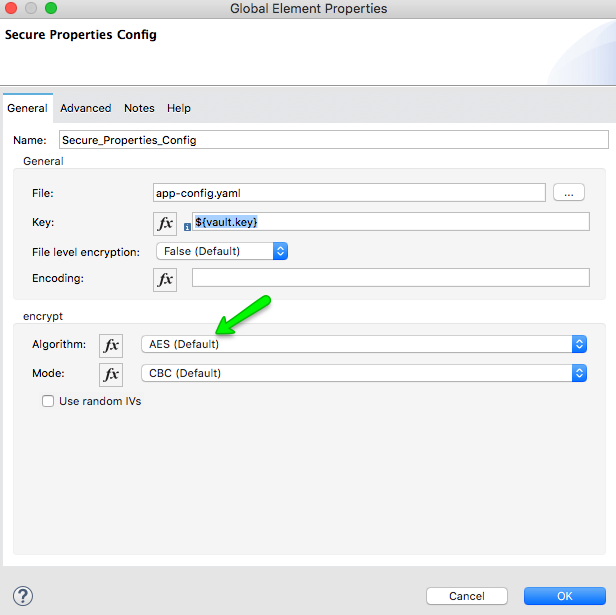
2. The algorithm is AES but the decryption key doesn't match the encryption key
SOLUTION
1. Change the “Secure Properties Config” configuration to make sure the encryption algorithm matches with the one used to encrypt the properties2. Use the key encrypted the properties in decryption.
If you are not using Secure Property, please check the below KB for a similar problem. JDK8 is required to be used while generating truststore file.
Deployment Fails With java.security.UnrecoverableKeyException
Knowledge 기사 번호
001122302
이 기사를 통해 문제를 해결했습니까?
개선을 위한 의견을 보내주세요.
