組織を選択
How to enable Initiator mode and change DPD action in Anypoint VPN
公開日: Oct 6, 2024
解決策
GOAL
Anypoint VPN has now introduced the new Initiator mode functionality. This feature allows the Anypoint VPN side to become the initiator.
By default, your CGW (customer gateway device) must bring up the tunnels for your Site-to-Site VPN connection by generating traffic and initiating the Internet Key Exchange (IKE) negotiation process. With this new feature, you can configure your VPN tunnels to specify that Anypoint VPN must initiate or restart the IKE negotiation process instead.
Initiator mode with different DPD options:
- Initiator mode enabled with DPD clear (default): The tunnel will shutdown after a DPD failure and remain down. The new tunnel initiation is triggered when there is traffic.
- Initiator mode enabled with DPD restart: MuleSoft will attempt to re-initiate the tunnel immediately after a DPD failure, even when there is no traffic.
Important: This Knowledge Article aims to provide basic guidelines for configuring Anypoint VPN as initiator. The contents of the article are to be used at your own risk and are provided as-is. For further information on configuring your own VPN devices, please reach out to the device vendor.
Anypoint VPN tunnel IKE initiation options
The following IKE initiation options are available. You can implement either or both options for your VPN tunnels.
-
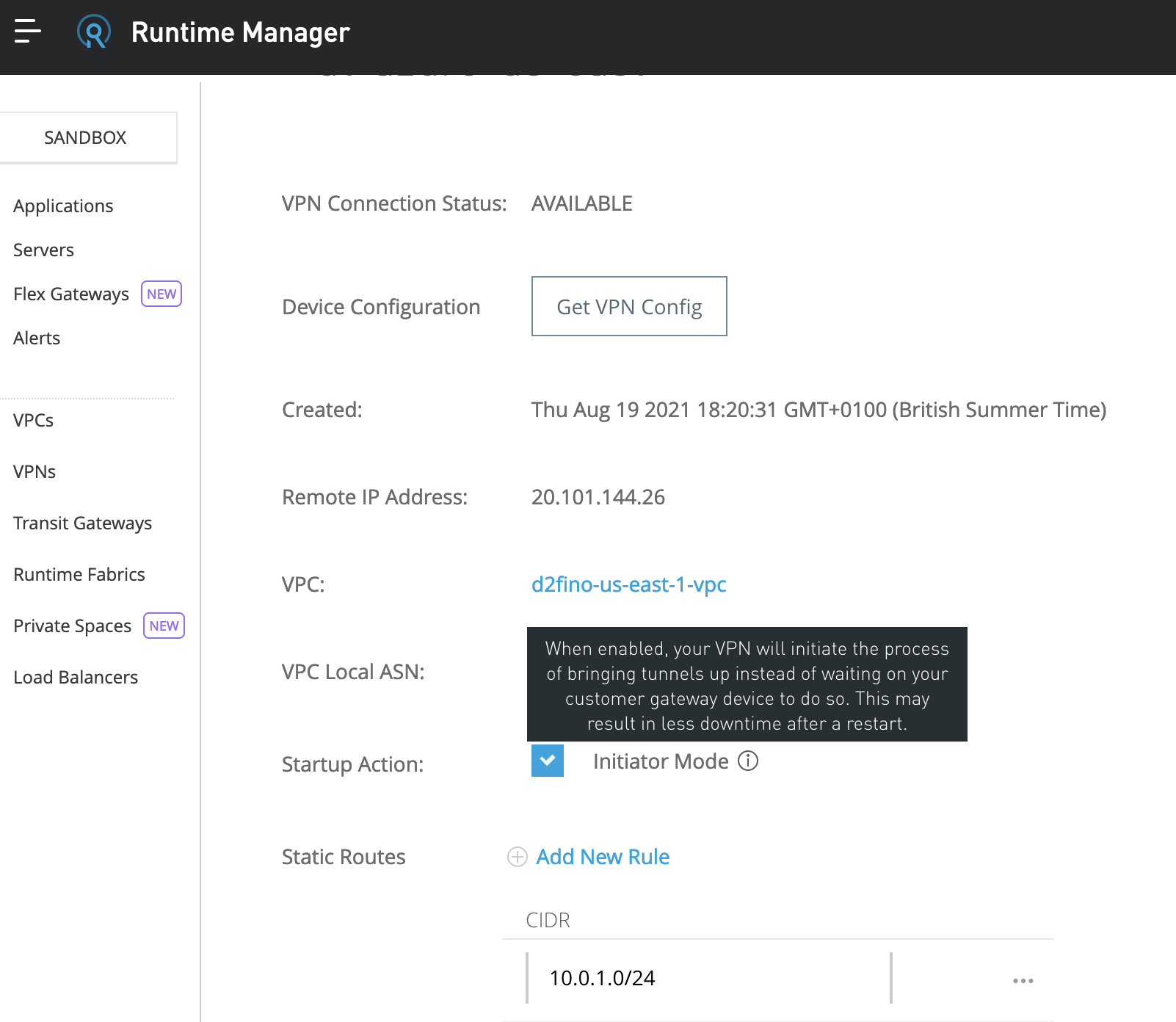
Startup action: The action to take when establishing the VPN tunnel for a new or modified VPN connection. By default, your customer gateway device initiates the IKE negotiation process to bring the tunnel up. Now you can specify that Anypoint VPN must initiate the IKE negotiation process instead.
* Don't change this value to Start on any VPN that is connected to a software based firewall running on AWS, the tunnels won't come UP, it's suggested by AWS to keep it on Add. -
DPD timeout action: The action to take after dead peer detection (DPD) timeout occurs. By default, the IKE session is stopped, the tunnel goes down, and the routes are removed. You can specify that Anypoint VPN must restart the IKE session when DPD timeout occurs, or you can specify that no action is taken when DPD timeout occurs.
You can configure the IKE initiation options for one or both of the VPN tunnels in your Anypoint VPN connection.
Limitations
The following limitations apply:
- IKE initiation (startup action) from the Anypoint side of the VPN connection is supported for IKEv2 only with route based VPN. Does not support policy based VPNs.
- Route-based VPN must be used. Policy-based VPN is not supported.
- If your customer gateway device is behind a firewall or other device using Network Address Translation (NAT), it must have an identity (IDr) configured. For more information about IDr, see RFC 729
- Fragmentation: The initiator connection proposal is large, and it requires that the answering Customer VPN Gateway allow fragmentation. Some gateways do not, you will need to check with your vendor. One known such CGW is Azure VPN.
- Ambiguous/unintended proposal: The large proposal from Anypoint VPN can result in unintended (or rejected) security combinations at the Customer VPN Gateway. You will need to monitor your logs to ensure the correctness and desirability of the connections that are made. Note that these can change over time due to configurations for VPNs being added or deleted on the CGW.
- Default Proposal: By default, VPN endpoint on AWS side will propose AES-128, SHA-1 and DH group Reference: AWS VPN FAQs
Important note: From the MuleSoft Side it is currently not possible to make any changes from the backend (on AWS ) to have the options to modify and select the proposals based on the customer gateway device, it would be suggested to vote for an idea through our Ideas portal:
If you do not configure IKE initiation from the Anypoint side for your VPN tunnel and the VPN connection experiences a period of idle time (usually 10 seconds, depending on your configuration), the tunnel might go down. To prevent this, you can use a network monitoring tool to generate keepalive pings.
PROCEDURE
There are two ways to enable the initiator mode, either via Runtime Manager UI or using an API call.
To enable via the Runtime Manager UI, go to VPNs section, click on your VPN and then tick the Startup Action for Initiator Mode
Enable via API call
Supported values:
dPDTimeoutActioncan take values :clear, none, restartStartupActioncan take values:start, add- For more information please refer to: https://docs.aws.amazon.com/vpn/latest/s2svpn/VPNTunnels.html
Please follow these steps:
- You will need a bearer token to send the request. Please refer to the How to generate your Authorization Bearer token for Anypoint Platform or How to generate a bearer token for Anypoint Platform API calls using a SAML enabled account
- The API call requires your org-id, vpc-id, and vpn-id. You can find your org-id by following this article
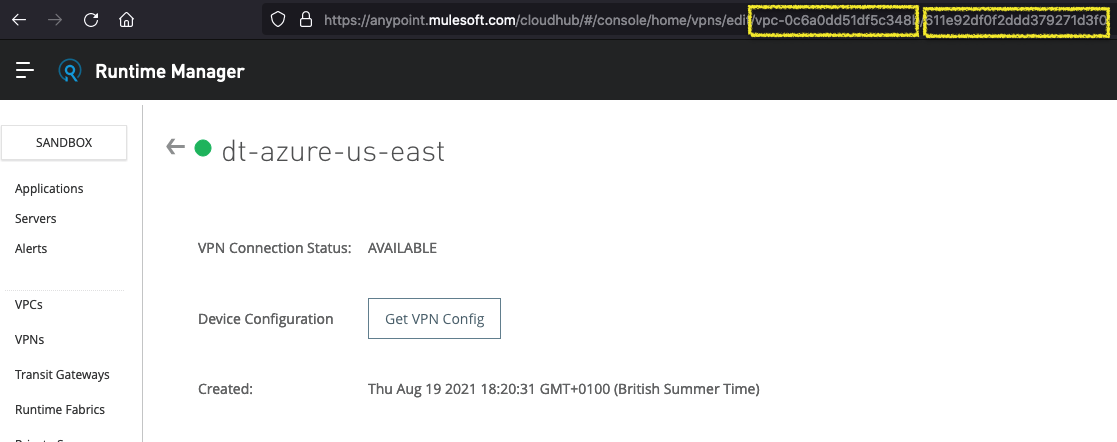
- For vpc-id and vpn-id please log in to Runtime Manager -> VPNs and click on the VPN you want to edit. Then you can see the values in the URL in the address bar of your browser i.e: https://anypoint.mulesoft.com/cloudhub/#/console/home/vpns/edit/vpc-0c6a0dd51df5c344b/611e92df0f2ddd379271d1f0 where the vpc-id is vpc-0c6a0dd51df5c344b and the vpn-id is 611e92df0f2ddd379271d1f0
4. Send a PUT request substituting the placeholders <org-id>, <vpc-id>, <vpn-id>, <token> with your own values from previous steps. In the below we will make this VPN the initiator so we change the "startupAction" to start.
Notes:
1) The "REMOTE_IP" , "TUNNEL_0_IP" and "TUNNEL_1_IP" values are placeholders, please replace them with the actual IPs.
2) If using Dynamic routing, you can omit the "remoteNetworks" stanza.
curl --request PUT 'https://anypoint.mulesoft.com/cloudhub/api/organizations/<org-id>/vpcs/<vpc-id>/ipsec/<vpn-id>' \
--header 'Authorization: bearer <token>' \
--header 'Content-Type: application/json' \
--data-raw '{
 "remoteIpAddress": "REMOTE_IP",
 "remoteNetworks": [
 "10.0.1.0/24",
 "10.0.2.0/24"
 ],
 "tunnelConfigs": [
 {
 "localExternalIpAddress": "TUNNEL_0_IP",
 "dPDTimeoutAction": "clear",
 "startupAction": "start"
 },
 {
 "localExternalIpAddress": "TUNNEL_1_IP",
 "dPDTimeoutAction": "clear",
 "startupAction": "start"
 }
 ]
}'
6. You can send another API call to check that the values have modified. Please be patient as the modification usually takes between 15-20mins during which time the tunnels will go down whilst the endpoints are updated.
curl 'https://anypoint.mulesoft.com/cloudhub/api/organizations/4936c81d-1a42-41b6-8227-c25fd978d9fba/vpcs/vpc-0c6a0dd51df5c3481b/ipsec' --header 'Authorization: Bearer 8b24b2b4-21f3-4c44-98ac-7ddd76d92e6a' -s | jq -rNote: If your account is using the EU control plane, please use the endpoint https://eu1.anypoint.mulesoft.com
7. Should you experience any difficulties please reach out to our Support.
ナレッジ記事番号
001122402
この記事で問題は解決されましたか?
ご意見をお待ちしております。
