Seleziona un'organizzazione
How to Monitor for Exhausted CPU Credits of 0.x vCore Workers by Using Anypoint Monitoring
Data pubblicazione: Mar 2, 2024
Risoluzione
SYMPTOM
An application deployed to a 0.x fractional vCore worker processes data with reasonable performance. After some time, the performance degrades and the processing slows down.CAUSE
Among many reasons, i.e., application design issues, this may also be caused by exhausting CPU credit balance.Indeed, 0.1 and 0.2 vCore application workers may burst 100% CPU utilization for a short period. However, should this be happening for some significant amount of time, the burst balance can deplete and the underlying infrastructure hypervisor may prevent the worker from using more than a certain amount of CPU time.
In virtualized environments like CloudHub, if a virtual machine is not given CPU time, this is shown as CPU Steal time:
It counts the ticks spent
executing other virtual hosts (in virtualized environments like Xen)
For example, by using the sysstat package it can be reported as:
10:47:20 AM     CPU     %user     %nice   %system   %iowait    %steal     %idle
10:47:23 AM     all     10.90      0.48      0.80      0.00     86.38      1.44
10:47:26 AM     all     10.32      0.15      0.44      2.62     80.81      5.67
10:47:29 AM     all     11.30      0.00      0.62      0.15     77.24     10.68
10:47:32 AM     all     11.52      0.16      0.16      0.00     80.00      8.16
10:47:35 AM     all     11.30      0.14      0.72      0.00     79.69      8.15
It can also be found using the top command:
top - 00:42:31 up 5 days, 16:15,  2 users,  load average: 4.90, 9.06, 11.45
Tasks:   1 total,   0 running,   1 sleeping,   0 stopped,   0 zombie
Cpu(s):  7.7%us,  0.5%sy,  0.9%ni,  1.1%id,  1.8%wa,  0.0%hi,  0.0%si, 88.1%st
However, it is impossible to use command-line tools in CloudHub due to the lack of SHELL access.
SOLUTION
This can be achieved with newly introduced metrics in Anypoint Monitoring starting from November 2021.Prerequisites
- Mule runtime 4.3 November 2021 release or newer
- Experience building How to Start Creating Custom Dashboards from Scratch Effectively
Procedure
The cpu_steal_time metric is stored in operating system dimension. Please navigate via Anypoint Monitoring > Custom dashboards > Configure > General > Panel Type > Application Panel > From operatingsystem.A typical dashboard configuration would look like this:
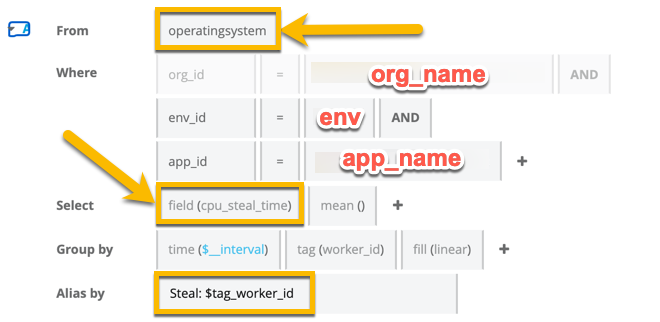
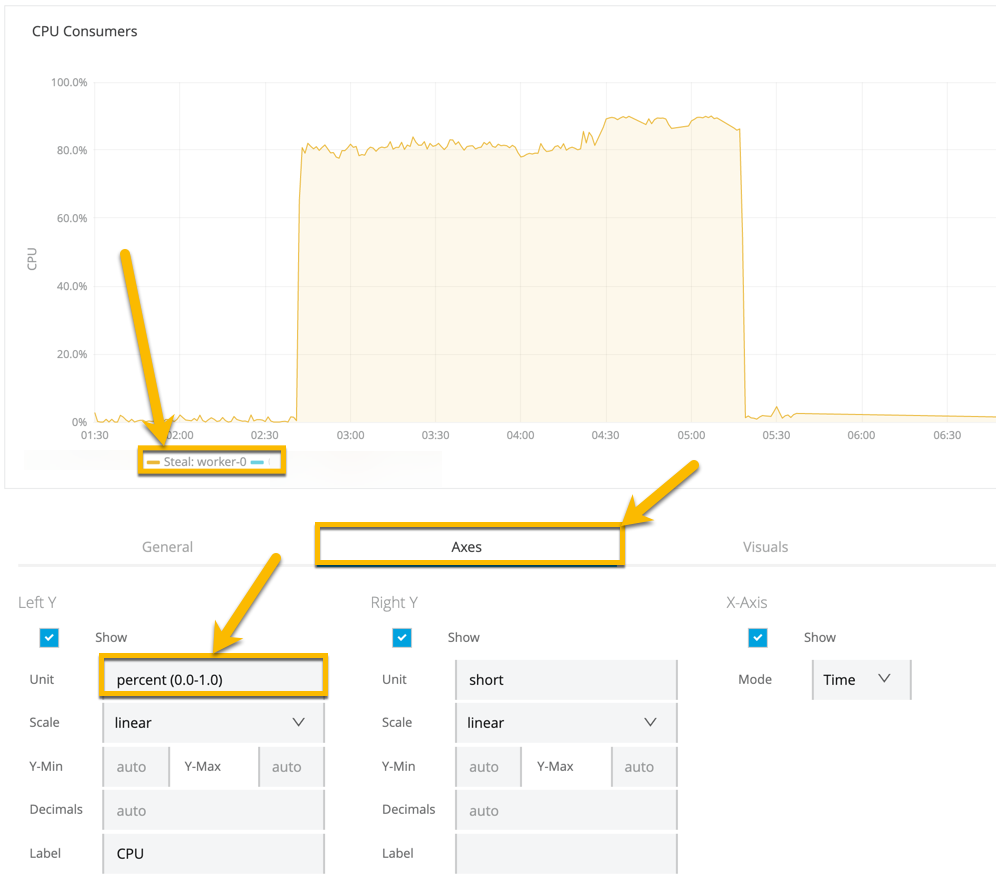
If CPU Steal time is observed on the dashboard, most likely, the CPU burst balance is exhausted. To restore it, the application needs to remain idle for some time.
Note, 1-3% of CPU Steal Time at idle is normal in a virtualized environment and not to be considered as an issue.
Note :
Please note that you can’t track the custom metric for CPU credits associated with CloudHub worker's AWS instances. Here is an idea that exists and you can get it upvoted. The worker size X vcore run based on AWS credits if you use your processing capacity intensively you will spend all your credits and the CPU capacity goes down.Disclaimer: This solution provides a suggestion that should be considered in conjunction with your specific use-case and requirements and does not represent a complete solution for all circumstances.
Anypoint Monitoring Overview
Anypoint Monitoring Knowledge Base Master Page
Numero articolo Knowledge
001122456
Questo articolo ha risolto il problema?
Facci sapere, così possiamo migliorare!
