We use three kinds of cookies on our websites: required, functional, and advertising. You can choose whether functional and advertising cookies apply. Click on the different cookie categories to find out more about each category and to change the default settings.
Privacy Statement
Required cookies are necessary for basic website functionality. Some examples include: session cookies needed to transmit the website, authentication cookies, and security cookies.
Functional cookies enhance functions, performance, and services on the website. Some examples include: cookies used to analyze site traffic, cookies used for market research, and cookies used to display advertising that is not directed to a particular individual.
Advertising cookies track activity across websites in order to understand a viewer’s interests, and direct them specific marketing. Some examples include: cookies used for remarketing, or interest-based advertising.
You are using OAuth 2.0 authentication in your Mule application and performing OAuth dance by invoking Authorize URL configured in the OAuth 2.0 configuration in your application.
In this example, the authorization URL is invoked from the browser:
error while authorizing:: error=redirect_uri_mismatch&error_description=redirect_uri%20must%20match%20configuration
e.g., Salesforce OAuth 2.0 dance throwing "redirect_uri_mismatch" error.
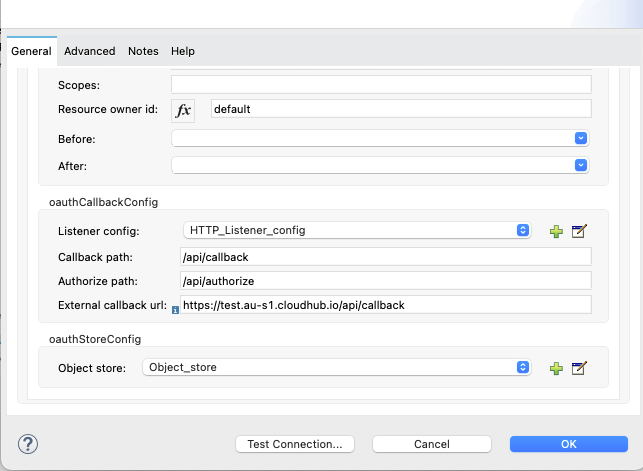
[2021-10-15 10:54:55.111] DEBUG org.mule.service.http.impl.service.HttpMessageLogger.HTTP_Listener_config [http.listener.01 SelectorRunner]: LISTENER HTTP/1.1 302 Moved Temporarily Content-Length: 0 location: https://test.my.salesforce.com/services/oauth2/authorize?response_type=code&client_id=.....&redirect_uri=https%3A%2F%2Ftest-salesforce.us-e2.cloudhub.io%2Fapi%2FcompositeCallbackAfter authorizing the client, the Authorization server invokes the callback URL to pass the access token and refresh tokens. This is configured in the "oauthCallbackConfig" of your application, e.g.,
However, in this case, the callback URL configured in the server is different from the URL configured in your Mule application resulting in the Redirect URI Mismatch error.
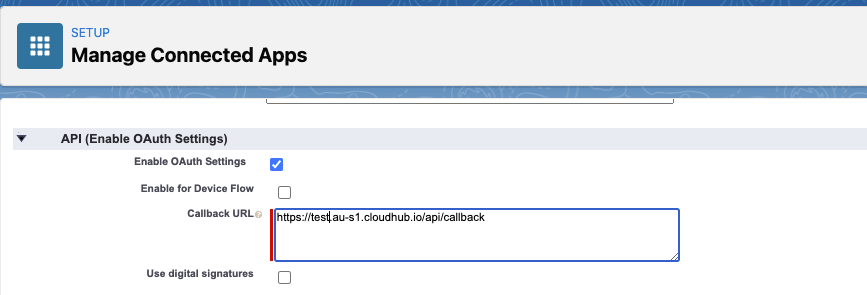
In order to resolve this issue, you need to ensure that the OAuth 2.0 callback URL configured in your server should match with the URL where your application is configured. Once configured in your "oauthCallbackConfig", callback URL will implicitly create an endpoint listening to this URL. Based on the type of deployment, you need to ensure that the whole URL should be configured in the server's OAuth 2.0 client application config, e.g.,
001122778