Vælg en organisation
MuleSoft Enable Verbose (Debug) Logging for Different Modules in Mule 4
Udgivelsesdato: Dec 22, 2025
Beskrivelse
How to add verbose (debug) logging for the different Mule Modules and Connectors in Mule 4.
Løsning
In MuleSoft, to enable verbose logging for Mule modules and connectors, review the following details. Please note that this logging level should only be used for troubleshooting purposes. See The impact of Excessive Verbose Logging on Application Performance for more information.
If the Module or Connector you wish to enable debug logging for is on the list below, please just follow the link to that Support Article:
HTTP Connector
How to Enable Debug Trace logs for Salesforce Connector in Mule 3 and Mule 4 (Wire Logging)
FTP, SFTP and FTPS Connectors
Netsuite Connector
Amazon SQS Connector
Microsoft Dynamics 365 Connector
SAP Connector
Anypoint MQ Module
Database Module
How to Enable Mule Batch Debug Logging on Mule 3 and 4
If your Module/Connector is not on the above list, please proceed to do the following:
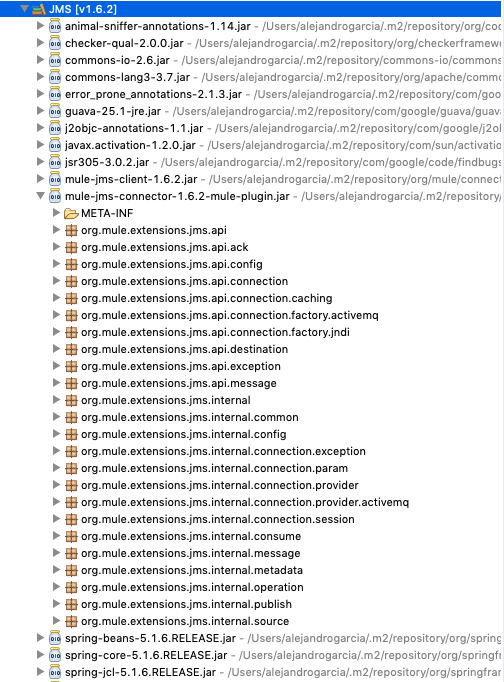
1. Inspect the Module/Connector dependency on the package explorer left bar. You will have to open the library and inspect its JAR files until finding one with the name of the Module/Connector. Inside that JAR, you can find all Mule-related packages. For instance, for the JMS Module, you will find a mule-jms-connector JAR as on the image below:
2. Add the following entry in your log4j2.xml file:
<Loggers>
    ...
    <AsyncLogger name="<package>" level="DEBUG"/>
    ...
</Loggers>
For example, for the above JMS Module, add:
<Loggers>
    ...
    <AsyncLogger name="org.mule.extensions.jms" level="DEBUG"/>
    ...
</Loggers>
3. Enable HTTP wire logging and add the following AsyncLogger to your log4j2.xml:
<AsyncLogger name="org.apache.http" level="DEBUG"/>
4. If your connector is using HTTPS, then also enable SSL debug.
Vidensartikelnummer
001123109
Løste denne artikel dit problem?
Giv os besked, så vi kan forbedre os!
