Seleccionar una organización
How to collect tcpdump of a Pod Inside RTF AWS EKS Self-Managed Kubernetes
Fecha de publicación: Mar 2, 2024
Solución
Other generic instructions on tcpdump collection in RTF:
How to run a tcpdump at Pod Level in RTF
How to Capture Networking Traffic of a Mule Application or another Pod in RTF
STEPS TO FOLLOW
1. Get the Environment ID :
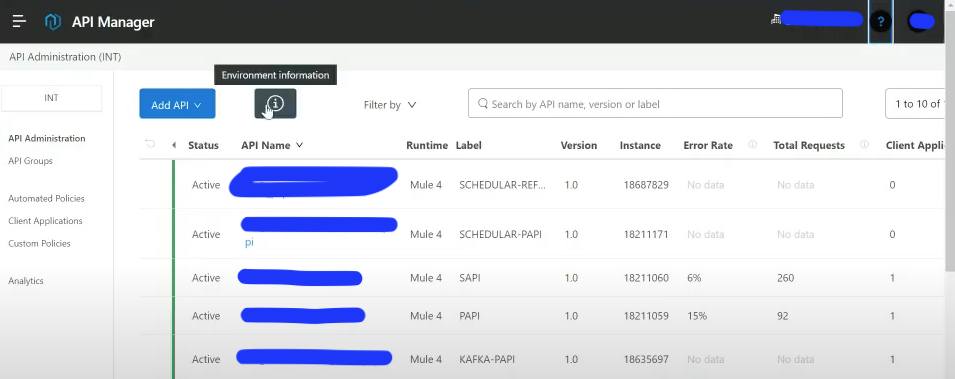
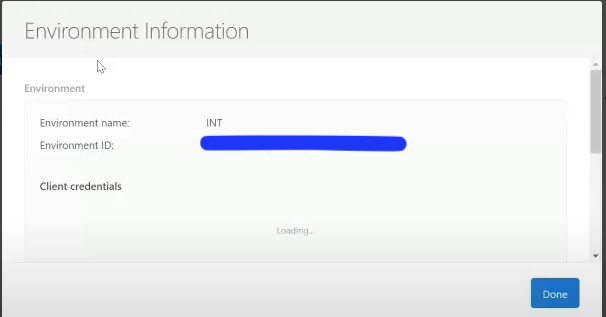
2. kubectl get pods -n <environment id>
Ex: [mulecloud@ip-172-x-x-x~]$ kubectl get pods -n Obdefof5-5142
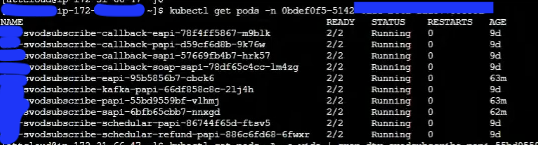
Get the app name from above results and run below query to get the worker IP.
3. kubectl get pods -A -o wide | grep <app name>
Ex: kubectl get pods -A -o wide | grep scvodsubscrive-papi-xxxxx

Obdefof5-5142_XXXXX       scvodsubscrive-papi-xxxxx  2/2 Running 0 63m  172.xx.xx.xx
172.xx.xx.xxx.us-west-1.compute.internal  <none>  <none>

4. kubectl exec -it <appname> -n <enviroment id> -c app - - bash
ex: [mulecloud@ip-172-x-x-x~]$  kubectl exec -it scvodsubscrive-papi-xxxxx -n Obdefof5-5142-xxxxxx -c app -- bash
app@scvodsubscrive-papi-xxxxx:/opt/mule$
app@scvodsubscrive-papi-xxxxx:/opt/mule$
app@scvodsubscrive-papi-xxxxx:/opt/mule$

5. Run "ip a" command to get the eth0 address
app@scvodsubscrive-papi-xxxxx:/opt/mule$ ip a
1: lo: <LOOPBACK, UP,LOWER_IP> mtu 65536 qdisc noqueue state UNKNOWN group default qlen 1000
   link/loopback 00:00:00:00:00:00 brd 00:00:00:00:00:00
   inet 127.0.0.1/8 scope host lo
       valid lft forever preferred_lft forever
   inet6 ::1/128 scopehost
       valid lft forever preferred_lft forever
2: eth0@if50: <BROADCAST,MULTICAST,UP,LOWER_IP> mtu 9001 qdisc noqueue state UP group default
   link/loopback b6:1c:d8:e9:97:47 brd ff:ff:ff:ff:ff:ff link-netnsid 0
   inet 172.31.77.63/32 scope host eth0
         valid lft forever preferred_lft forever
   inet6 fe80::b41c:d8ff:fee9:9747/64 scope link
         valid lft forever preferred_lft forever

6. Login to woker ip which you got from 4 step and install tcpdump if you don't have it.
sudo su
root@ip-172.xx.xx.xxx ]
root@ip-172.xx.xx.xxx ]  yum install tcpdump
7. Get the ether name from step 7. (eth0@if50)
root@ip-172.xx.xx.xxx ]  ip a | grep *50
       50: enic5607190fc4@if3: <BROADCAST,MULTICAST,UP,LOWER_IP> mtu 9001 qdisc noqueue state UP group default

8 . Run the tcpdump capture command like below.
root@ip-172.xx.xx.xxx ] tcpdump -nni enic5607190fc4 -w /tmp/tcpdump.pcap

9. Once you capture the tcpdump review them through wireshark.
Número del artículo de conocimiento
001123636
¿Resolvió este artículo su problema?
¡Háganos saber cómo podemos mejorar!
