Organisation auswählen
Salesforce CRM Analytics Connector | OAuth JWT Connection Fails With 'User hasn't approved this consumer'
Veröffentlichungsdatum: May 20, 2025
Beschreibung
Salesforce CRM Analytics Connector OAuth JSON Web Token (JWT) connection fails with the below error that shows "user hasn't approved this consumer".
org.mule.runtime.api.connection.ConnectionException: CONNECTIVITY: Invalid status code: 400, response body: {"error":"invalid_grant","error_description":"user hasn't approved this consumer"}
org.mule.runtime.api.connection.ConnectionException: CONNECTIVITY: Invalid status code: 400, response body: {"error":"invalid_grant","error_description":"user hasn't approved this consumer"}
Caused by: java.io.IOException: Invalid status code: 400, response body: {"error":"invalid_grant","error_description":"user hasn't approved this consumer"}
Caused by: java.io.IOException: Invalid status code: 400, response body: {"error":"invalid_grant","error_description":"user hasn't approved this consumer"}
at org.mule.modules.salesforce.analytics.internal.connection.service.HttpClientService.executeMethod(HttpClientService.java:85)
at org.mule.modules.salesforce.analytics.internal.connection.service.HttpClientService.sendPost(HttpClientService.java:74)
at org.mule.modules.salesforce.analytics.internal.connection.service.OAuthTokenBearerService.sendAuthorizationRequestAndParseResponse(OAuthTokenBearerService.java:147)
at org.mule.modules.salesforce.analytics.internal.connection.service.OAuthTokenBearerService.login(OAuthTokenBearerService.java:89)
at org.mule.modules.salesforce.analytics.internal.connection.provider.OAuthJWTConnectionProvider.createPartnerConnection(OAuthJWTConnectionProvider.java:36)
at org.mule.modules.salesforce.analytics.internal.connection.provider.AbstractOAuthBearerConnectionProvider.connect(AbstractOAuthBearerConnectionProvider.java:71)
at org.mule.modules.salesforce.analytics.internal.connection.provider.AbstractOAuthBearerConnectionProvider.connect(AbstractOAuthBearerConnectionProvider.java:34)
at org.mule.runtime.module.extension.internal.runtime.config.ClassLoaderConnectionProviderWrapper.connect(ClassLoaderConnectionProviderWrapper.java:60)
at org.mule.runtime.core.internal.connection.ConnectionUtils.connect(ConnectionUtils.java:52)
at org.mule.runtime.core.internal.connection.AbstractConnectionProviderWrapper.connect(AbstractConnectionProviderWrapper.java:63)
at org.mule.runtime.core.internal.connection.ErrorTypeHandlerConnectionProviderWrapper.connect(ErrorTypeHandlerConnectionProviderWrapper.java:64)
at org.mule.runtime.core.internal.connection.ConfigNameResolverConnectionProviderWrapper.connect(ConfigNameResolverConnectionProviderWrapper.java:50)
at org.mule.runtime.core.internal.connection.ConnectionUtils.connect(ConnectionUtils.java:52)
at org.mule.runtime.core.internal.connection.AbstractConnectionProviderWrapper.connect(AbstractConnectionProviderWrapper.java:63)
at org.mule.runtime.core.internal.connection.DefaultConnectionProviderWrapper.connect(DefaultConnectionProviderWrapper.java:52)
at org.mule.runtime.core.internal.connection.CachedConnectionManagementStrategy.createConnection(CachedConnectionManagementStrategy.java:95)
at org.mule.runtime.core.api.util.func.CheckedSupplier.get(CheckedSupplier.java:25)
at org.mule.runtime.api.util.LazyValue.get(LazyValue.java:75)
at org.mule.runtime.core.internal.connection.CachedConnectionManagementStrategy.getConnectionHandler(CachedConnectionManagementStrategy.java:63)
at org.mule.runtime.core.internal.connection.DefaultConnectionManager.getConnection(DefaultConnectionManager.java:247)
at org.mule.runtime.core.internal.connection.DefaultConnectionManager.lambda$testConnectivity$1(DefaultConnectionManager.java:166)
at org.mule.runtime.core.internal.connection.DefaultConnectionManager.doTestConnectivity(DefaultConnectionManager.java:182)
Lösung
CAUSE
Permission for the connected applications and user is not configured properly in Salesforce.
SOLUTION
Follow the below steps in Salesforce:
- Go to Setup > Manage Connected Apps.
- Click on the connected app.
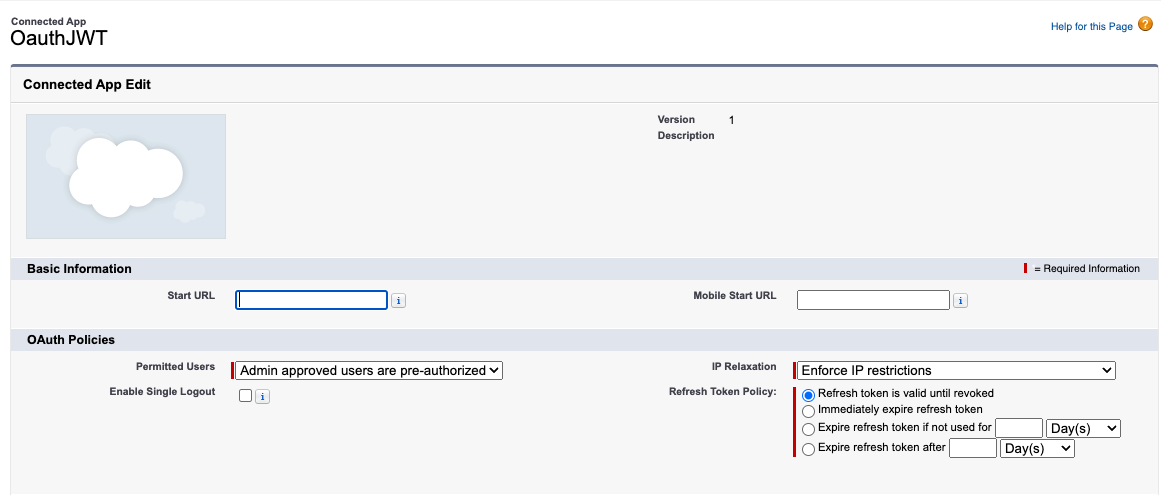
- Click Edit Policies.
- In OAuth Policies, set Permitted Users to Admin-approved users are pre-authorized.
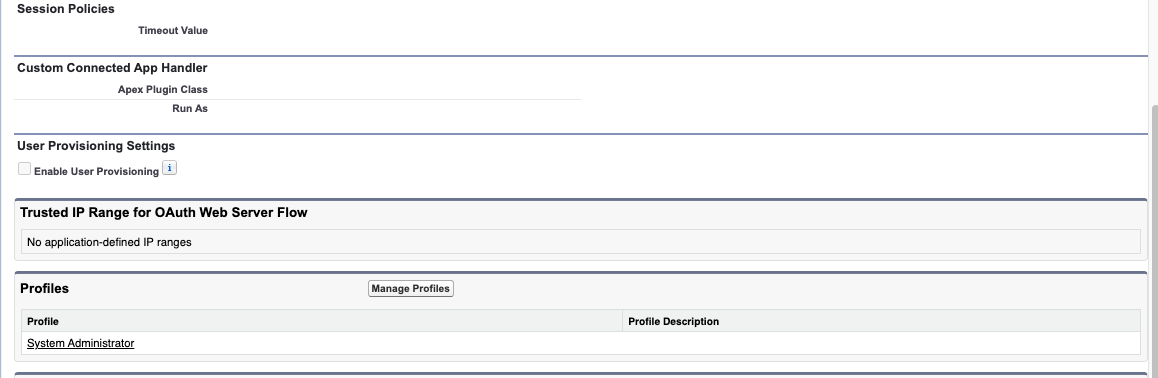
- In the same section "Manage Connected Apps", click on your connected app to see the policies
- In the Profiles Section, click Manage Profiles then select System Administrator
Nummer des Knowledge-Artikels
001123683
Konnten Sie Ihr Problem mithilfe dieses Artikels lösen?
Geben Sie uns Feedback, damit wir uns verbessern können.
