조직 선택
How to Delete a Hung Application in Starting or Stopping State in ARM
게시 일자: Jun 10, 2026
솔루션
SYMPTOM
The application remains starting or stopping in Anypoint Runtime Manager.

This status remains the same for some time.
CAUSE
When deploying or undeploying applications in ARM, sometimes the application fail to deploy or undeploy. Mule Runtime will inform Anypoint Runtime Manager that the application is running or stopped after completion of the deploy/undeploy operation. However, if the operation fails, this may never happen. In such a scenario, Anypoint Runtime Manager retains the last informed status which is "Starting" or "Stopping".
SOLUTION
Option 1
Restart the Mule Runtime. This will sync the status of the application with Anypoint Runtime Manager and allows you to redeploy or undeploy the application, if necessary.
Option 2
You can choose to wait. Every 30 mins (approximately), the platform sends a resync signal over all the Runtimes, detecting the invalid states.
Once the resync happens, the application status is determined and you will be able to perform subsequent operations from the Runtime Manager.
Option 3
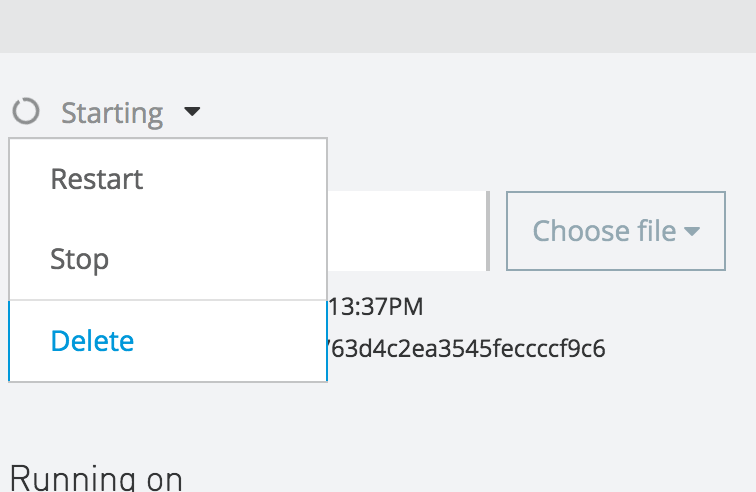
In some scenarios the platform allows you to delete the invalid deployment , and then deploy it again obviously that you have to fix the error that was causing the issue in the app first, to do that please check the mule_ee.log located in the logs folder and evaluate the issue.
Option 4
If this were a production environment and you cannot restart the environment, one possible solution would be to remove the old app from the /apps directory in your Mule instance or just the anchor.txt file (this should undeploy the app) and then throw the new zip file in the /apps directory in your Mule instance using as file name, the same application name used before.

Option 5
If Option 4 did not work, an alternative solution with a similar approach would be to remove the application from the server, deploy a sample "hello world" application to make it manageable again (and be able to remove it from Runtime Manager), and then redeploy the original artifact containing the logic of the app. This would be:- With the Runtime up and running, remove from the /apps directory in your Mule instance or the anchor.txt file corresponding to the application you want to remove --> This will remove the corresponding /apps directory in your Mule instance as well. If this can't be done because the process is holding the file. Stop it, remove it, and start it back again.
- Remove from <MULE_HOME>/.mule/ any folder with the same name as the application to be removed. If this can't be done because the process is holding the file. Stop it, remove it, and start it back again.
- In Runtime Manager, deploy a new version of the app (as in Option 4), but choose the jar of the hello world app. Ensure to be using the same name for this jar. --> This will deploy the app successfully, making it appear as Running again, but with the logic of a Hello World app.
- Now we need to delete the app from Runtime Manager, so we can completely remove this faulty record.
- Now that the app is not there anymore, from Runtime Manager deploy the original ZIP (for Mule 3) or JAR (for Mule 4) artifact as a new deployment.
Option 6
In old Runtime Manager agent versions, previous option may fail if there is a cluster level issue like one node offline or failing while the other node working properly. So please make sure that the stand-alone server or all the cluster nodes (in case it's a cluster) are online before proceeding.
추가 자원
Please also check following article if your server remains stuck in Connected state:
Knowledge 기사 번호
001123821
이 기사를 통해 문제를 해결했습니까?
개선을 위한 의견을 보내주세요.
