Valitse organisaatio
New Setup Domain Rollout FAQ
Julkaisupäivä: Apr 30, 2026
Kuvaus
To align with modern browser security standards, Salesforce is migrating all Setup pages in Lightning Experience to the *.salesforce-setup.com domain.
The rollout began in Spring ’24, continued through Winter ’25 for sandboxes and non-production orgs, and resumes for production orgs in Winter ’26 based on instance upgrade schedules.
This article provides answers to frequently asked questions and guidance for resolving common issues related to the new Setup domain.
Note:
Refer to the revision history for the latest updates.
Ratkaisu
The following section answers common questions about the new Setup domain rollout and provides guidance to help you understand its impact, required actions, and potential issues you may encounter.
Frequently Asked Questions
- What is the change?
- What orgs does the change impact?
- Why is Salesforce moving Setup pages to a new domain?
- What actions are required to enable the change?
- How is Salesforce implementing the rollout?
- What is the rollout timeline?
- How can I confirm that the new domain is enabled?
- Does the change affect Salesforce Classic?
- What is the URL format of the new Setup domain?
- If my company is using IP address restriction but not domain restriction, do I need to add the new IP address to my company’s allowlists?
- What’s the impact of not adding the new domain to the allowlist?
- Can I opt out or request to delay the enablement of the new domain?
- I heard that Google is no longer planning to block third-party cookies in Chrome. Does this change affect the rollout?
- How does the new Setup domain impact the functionality of the Require first-party use of Salesforce cookies setting?
Jump to Solutions to Issues Related to the New Setup Domain.
What is the change?
Setup pages are now served from the *.salesforce-setup.com domain.
What orgs does the change impact?
The change applies to all Lightning Experience orgs with access to Setup pages. The change impacts both Hyperforce and non-Hyperforce instances.
Why is Salesforce moving Setup pages to a new domain?
Salesforce serves Setup content from multiple domains. A cross-domain cookie authenticates users when they access Setup in Lightning Experience. This process doesn’t work if third-party cookies are blocked. In January 2024, Google started a gradual rollout of its Privacy Sandbox initiative, which included phasing out support for third-party cookies from its Chrome browser. Although Google announced significant changes to the Privacy Sandbox initiative on April 22, 2025, Salesforce continues its rollout of the new Setup domain. Other popular browsers are also pushing to block third-party cookies, and Salesforce anticipates that companies will still block third-party cookies for their users.
In response to this changing landscape, Salesforce is moving all Setup content to a single, new domain: *.salesforce-setup.com. With this change, the cookie is treated as a first-party cookie and isn’t blocked. The change ensures that all users can access Setup pages in Lightning Experience.
What actions are required to enable the change?
If your users have general access to the internet, no action is required. If your company controls users’ or servers’ access to the internet through firewalls or allowlists, the IT department must add *.salesforce-setup.com to the company’s list of allowed domains. Salesforce Setup pages are now hosted on that domain.
How is Salesforce implementing the rollout?
The change is implemented with a staggered rollout. We first target a small subset of sandbox orgs, and then incrementally enable larger subsets until the domain is enabled across all orgs. This process improves our responsiveness to any issues that can occur.
The change isn’t tied to a specific patch release or maintenance window. The change isn’t enabled during an org’s sensitive time windows and doesn’t require downtime.
What is the rollout timeline?
We’re using a staggered rollout to move the Setup pages to the *.salesforce-setup.com domain. The rollout began in Spring ’24 and continued through Winter ’25. As of Winter ’25, the change is enabled in all sandboxes and nonproduction orgs. The rollout was paused in Spring ’25 and Summer ’25. It resumes for all production orgs in Winter ’26 according to the major release upgrade date for your instance.
How can I confirm that the new domain is enabled?
Open any Setup page and observe that the domain is *.salesforce-setup.com.
Does the change affect Salesforce Classic?
No. The new Setup domain doesn’t apply to Salesforce Classic, so there aren't any changes to the URLs of the Setup pages in Salesforce Classic.
What is the URL format of the new Setup domain?
- For production orgs:
- [MyDomainName].my.salesforce-setup.com/lightning/setup/SetupOneHome/home
- For sandbox orgs:
- [MyDomainName]--[SandboxName].sandbox.my.salesforce-setup.com/lightning/setup/SetupOneHome/home
For more information about current URL formats, see My Domain URL Format Changes When You Enable Enhanced Domains.
If my company uses IP address restriction but not domain restriction, do I need to add the new IP address to my company’s allowlists?
No, you don’t need to add any additional IP address ranges to your company’s allowlists. Your users don’t directly access https://salesforce-setup.com. Instead, users access Setup pages through https://[MyDomainName].my.salesforce-setup.com.
-
If your Salesforce org uses the Salesforce Edge Network or is in Hyperforce, the IP ranges are the same as your existing connections to your Salesforce org's My Domain hostnames.
-
If your Salesforce org is a first-party instance and not using the Salesforce Edge Network, the IP ranges in Salesforce Core Services - IP Addresses and Domains to Allow apply. The IP addresses are the same IP addresses used to connect to your org's My Domain hostnames.
What’s the impact of not adding the new domain to the allowlist?
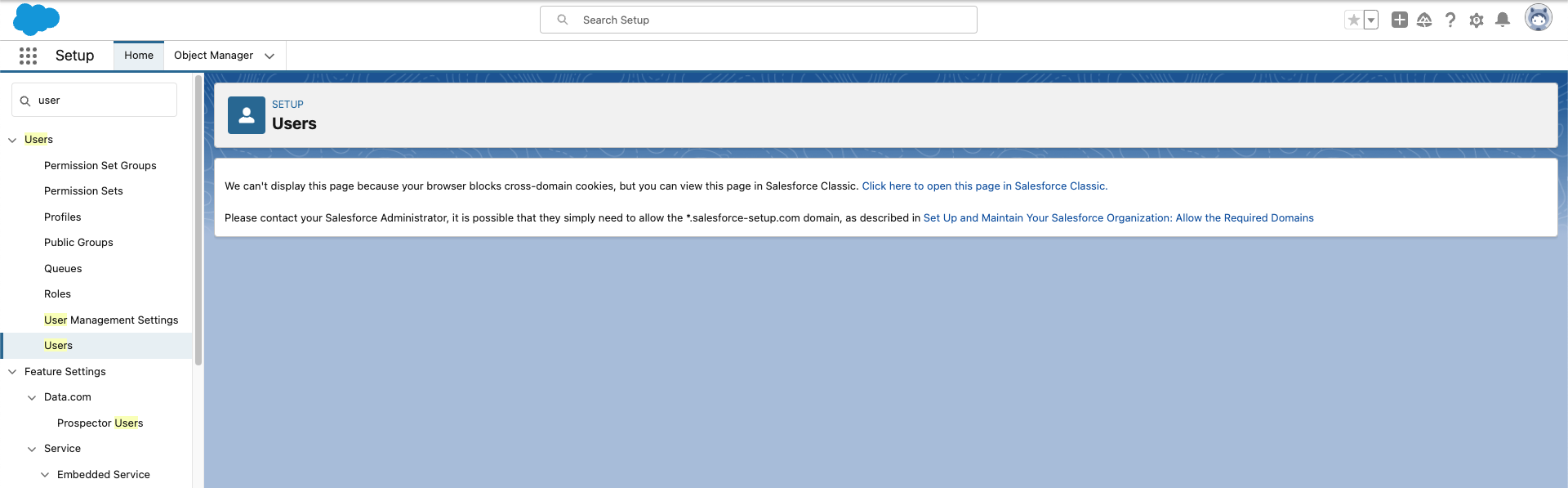
If your company doesn't update the allowlist, the code detects that the new Setup domain isn’t reachable, and the user is directed to the old Setup domain. If the user’s browser blocks third-party cookies, a warning message provides a link that opens Setup in a new Salesforce Classic tab. Then the user can continue to use all functions in Setup.
Can I opt out or request to delay the enablement of the new domain?
No, you can’t opt out or request a change to the rollout schedule. If your users experience issues, contact Support.
I heard that Google is no longer planning to block third-party cookies in Chrome. Does this change affect the rollout?
On July 22, 2024, Google reversed its plans to completely block third-party cookies for all Chrome users. Instead, Chrome users can decide whether to block third-party cookies. Despite Google's decision to not enforce third-party cookie restrictions, Salesforce still expects many users to opt out of third-party cookies due to privacy concerns. Additionally, other popular browsers such as Firefox already block third-party cookies by default. Therefore, Salesforce is committed to continuing the rollout of the new Setup domain as planned.
How does the new Setup domain impact the functionality of the Require first-party use of Salesforce cookies setting?
Starting in Summer ’24, you can enable the Require first-party use of Salesforce cookies setting, which removes the SameSite=None attribute from Salesforce cookies. Any interaction with the cookies that Salesforce serves mimics the behavior when third-party cookies are blocked, regardless of which browser you use.
If your org's Setup pages aren't served on the *.salesforce-setup.com domain, when this setting is enabled, accessing older Setup pages that were built in Classic requires an extra step. Users see a message that directs them to open the page in Salesforce Classic. Therefore, if the new Setup domain isn’t rolled out in your org, we don't recommend enabling this setting other than for short-term testing.
In Winter ’25 and later releases, both the *.salesforce-setup.com domain and the Require first-party use of Salesforce cookies setting are enabled by default for prerelease orgs and sandboxes on the these instances:
- USA16S
- USA222S
- USA196S
- USA198S
- USA18S
- USA10S
- USA246S
- USA4S
- USA12
- USA796
- USA794
- USA6S
- USA14S
For more information about this setting, see Test the Impact of Blocked Salesforce Session Cookies on Salesforce Help.
Solutions to Issues Related to the New Setup Domain
To view a Canvas App in Canvas App Previewer, add the new Setup domain to your app’s Content Security Policy (CSP) frame-ancestors directive.
If your Canvas app has the CSP frame-ancestors directive set, you must add *.salesforce-setup.com to the source list. Otherwise, the app isn’t viewable in Canvas App Previewer.
For more information about how blocking third-party cookies can affect Canvas apps, see How Third-Party Cookie Restrictions Impact Salesforce Canvas Apps in Salesforce Help.
If your org enables the “Enforce login IP ranges on every request” setting or the “Lock sessions to the IP address from which they originated” setting, update your company’s firewalls, proxy servers, and VPN routing policies so that the new *.salesforce-setup.com domain is routed in the same way as other Salesforce domains, such as *.force.com and *.salesforce.com.
These settings are located in the Session Settings page in Setup. If your company’s infrastructure configuration treats *.salesforce-setup.com differently from other Salesforce domains, then Setup pages can sometimes show an Access Denied error with the following message:
The IP address of your device from which you are trying to access Salesforce is not allowed by your Salesforce administrator. You may have changed locations or networks since you logged in. For help, please contact the Salesforce administrator at your company.
Until your company’s configuration is updated, to access Setup in Lightning Experience, users can navigate to the Session Settings page in Salesforce Classic, and then disable the “Enforce login IP ranges on every request” setting and the “Lock sessions to the IP address from which they originated” setting. For the changes to take effect, log out and log in to Salesforce.
On User Detail pages with custom buttons or links that launch a screen flow, refresh the page if you encounter an error when you click the link.
If the new Setup domain is enabled in your org, you may encounter a "*vf.force.com refused to connect" error when you click a custom button or link that's configured to launch a screen flow in the same window. To successfully launch the screen flow, refresh the page. As a workaround, configure the custom button or link to launch in a new window instead. See Define Custom Buttons and Links.
For potential status updates about this issue, see this Known Issue: Unable to launch screen flow configured as custom link from user detail page.
Revision History
| Date | Revision |
| April 1, 2024 | Initial article publication |
| April 10, 2024 | Updated: Can I opt out or request to delay the enablement of the new domain? --> Clarified scope of Support |
| June 25, 2024 |
Updated: What’s the impact of not adding the new domain to the allowlist? --> Added screenshot of Setup page when third-party cookies are blocked. Added: Solutions to Issues Related to the New Setup Domain section Added: Additional resources
|
| July 11, 2024 |
Updated: What is the rollout timeline? --> The rollout is extended into Winter '25. Removed: Make sure that hard coded references of Setup page URLs are in the current format paragraph --> Salesforce has resolved the issue. |
| August 1, 2024 |
Added: |
| August 20, 2024 |
Updated: How does the new Setup domain impact the functionality of the Require first-party use of Salesforce cookies setting? --> In Winter ’25, the setting is enabled by default only for pre-release orgs and sandboxes the listed instances. Previously, it was stated that the setting is enabled for all orgs. |
| October 7, 2024 |
Added: If your org enables the “Enforce login IP ranges on every request” setting, update your company’s firewalls, proxy servers, and VPN routing policies so that the new *.salesforce-setup.com domain is routed in the same way as other Salesforce domains, such as *.force.com and *.salesforce.com. |
| October 11, 2024 |
Updated: If your org enables the “Enforce login IP ranges on every request” setting or the “Lock sessions to the IP address from which they originated” setting, update your company’s firewalls, proxy servers, and VPN routing policies so that the new *.salesforce-setup.com domain is routed in the same way as other Salesforce domains, such as *.force.com and *.salesforce.com. --> This topic also applies to the “Lock sessions to the IP address from which they originated” setting. |
| April 17, 2025 |
Updated the rollout dates to indicate that the rollout continues through Summer '25. |
| April 24, 2025 |
Updated the rollout dates to indicate that the rollout is paused in Summer '25 and continues in Winter '26. |
| July 21, 2025 |
Refreshed links. |
| July 22, 2025 |
Copy edits. Updated rollout timeline. |
| October 28, 2025 |
Added an entry to the "Solutions to Issues Related to the New Setup Domain" about screen flows launched from the User Detail page. |
Lisäresurssit
Knowledge-artikkelin numero
001395243
Ratkaisiko tämä artikkeli ongelmasi?
Anna palautetta, jotta voimme kehittyä!
