Seleccionar una organización
Certain permissions missing in App and System permission section when the permission set is created with Salesforce API integration License.
Fecha de publicación: Apr 3, 2026
Descripción
- Go to Setup > Permission sets
- Click 'New' and create a permission set with a license as Salesforce API integration
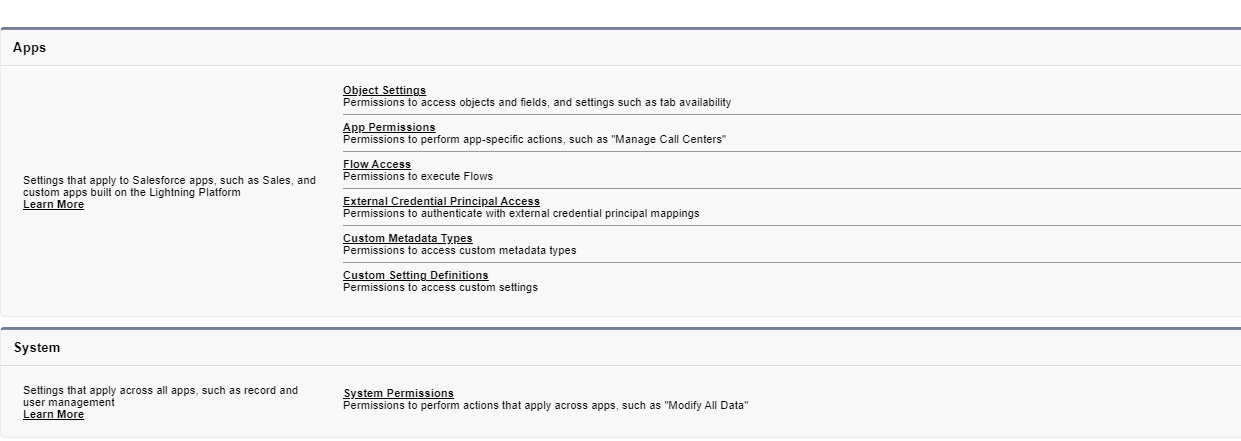
- Now observe you will only see the below sections
Because of the above, the API integration users with this permission set are not able to get access to the components from those missing sections.
Please note that below are the sections which you will not be able to access when the permission set is associated with Salesforce API Integration License
> Assigned Apps
> Assigned Connected Apps
> Apex Class Access
> Visualforce Page Access
> External Data Source Access
> Named Credential Access
> Service Presence Statuses Access
> Custom Permissions
> Organization-Wide Email Address Access
> Standard Invocable Action Type Access
> Service Providers
Solución
To provide access to the missing components, create a second permission set without the API Integration License, grant the required permissions, and assign both permission sets to the user.
Número del artículo de conocimiento
001453686
¿Resolvió este artículo su problema?
¡Háganos saber cómo podemos mejorar!
