Velg en organisasjon
How to Hide a Specific Dimension Value from the View in Tableau
Publiseringsdato: Feb 24, 2026
Oppgave
Hiding a dimension value removes it from the visualization but does not exclude it from the data source. This is useful when you want to temporarily remove certain categories from analysis without applying a filter or modifying the dataset.
Trinn
- Hover the cursor over the dimension value you want to hide
- Right-click on the dimension value.
- Select Hide.
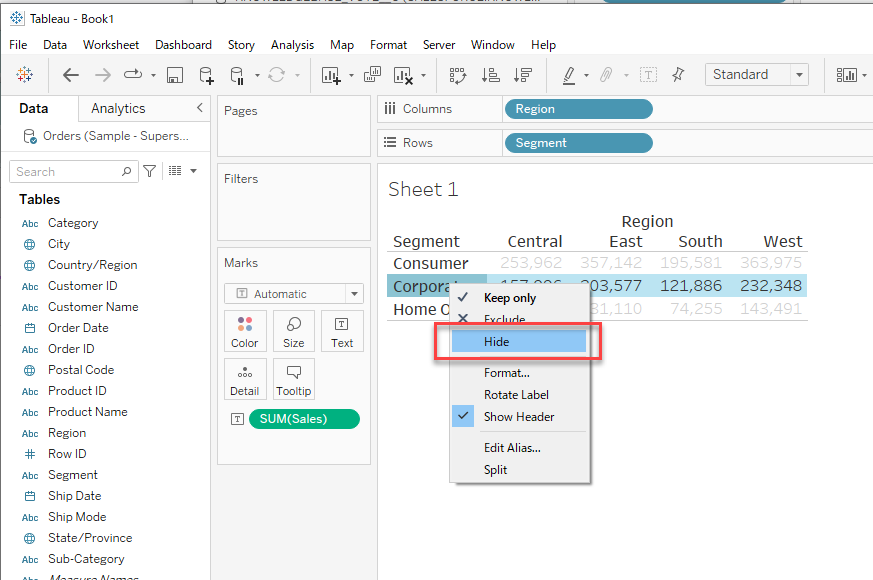
Example Use Case:
You are analyzing sales by region and want to temporarily remove a specific region from the view without applying a filter.
Additional Notes:
• Hidden values are not removed from calculations but will not be displayed in the view.
• To restore hidden values, go to the Data Pane, right-click the field, and select Show hidden data.
Flere ressurser
Knowledge-artikkelnummer
001453738
Hjalp denne artikkelen med å løse problemet ditt?
La oss få vite det slik at vi kan forbedre!
