Seleziona un'organizzazione
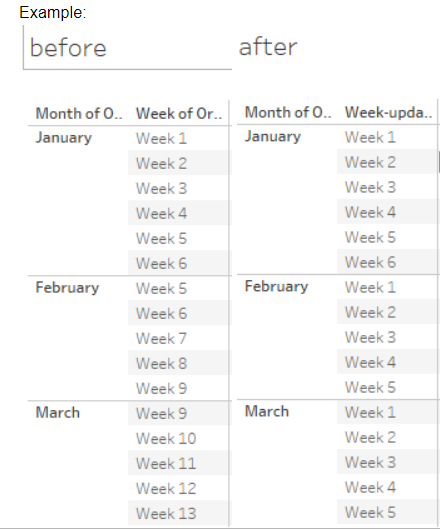
How to Display Week Number by Month
Data pubblicazione: Apr 13, 2024
Operazione
How to display week number by month. By default week number is displayed by year.
Fasi
-
Create a [Week-min] calculation field as shown below:
{ FIXED MONTH([Order Date]):MIN(DATEPART('week',[Order Date]))} - Create a [Week-updated] calculation field as shown below
CASE DATEPART('week',[Order Date]) WHEN [Week-min] THEN "Week 1" WHEN [Week-min]+1 THEN "Week 2" WHEN [Week-min]+2 THEN "Week 3" WHEN [Week-min]+3 THEN "Week 4" WHEN [Week-min]+4 THEN "Week 5" WHEN [Week-min]+5 THEN "Week 6" END
Risorse aggiuntive
Numero articolo Knowledge
001453773
Questo articolo ha risolto il problema?
Facci sapere, così possiamo migliorare!
