Vælg en organisation
How To Create A Calculated Field For Power Trend Line Equation
Udgivelsesdato: Apr 13, 2024
Opgave
Trin
2. Calculate the slope:
WINDOW_COVAR(ATTR([LN X]), ATTR([LN Y])) / WINDOW_VAR(ATTR([LN X]))
where WINDOW_COVAR returns the sample covariance of two expressions within the window and WINDOW_VAR returns the biased variance of the expression within the window
3. Calculate the intercept:
WINDOW_AVG(ATTR([LN Y])) - WINDOW_COVAR(ATTR([LN X]), ATTR([LN Y])) / WINDOW_VAR(ATTR([LN X])) * WINDOW_AVG(ATTR([LN X]))
4. The power trend line equation formula (trend line) :
EXP([intercept])*POWER(ATTR([X]),[slope])
5. Convert X and Y to dimension and drag them to view on rows
6. Go to Analysis -> Deselect the Aggregate Measures
7. Drag trend line to rows besides X and Y and select discrete
Yderligere ressourcer
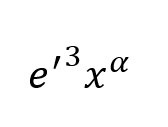
α = n∑(xy)−∑x∑y / ( n∑x2−(∑x)2)
Intercept
β = (∑y−α∑x) / n
Equation:
Vidensartikelnummer
001453845
Løste denne artikel dit problem?
Giv os besked, så vi kan forbedre os!
