Välj en organisation
Time Values In Hh:mm:ss Format Is Not Recognized Properly When It's More Than 24 Hours
Publiceringsdatum: Apr 13, 2024
Uppgift
How to read column values having time expressed in hh:mm:ss format. Example values: 27:22:55, 05:03:00 etc
Steg
2. If you want to calculate average/sum of the duration, first convert the values like 27:22:55 into duration in minutes/hours/seconds using a calculation like below that gives duration in minutes
INT(( SPLIT( [Duration], ":", 1 ) ))*60
+
INT(TRIM( SPLIT( [Duration], ":", 2 ) ))
+
INT(TRIM( SPLIT( [Duration], ":", 3 ) ))/60
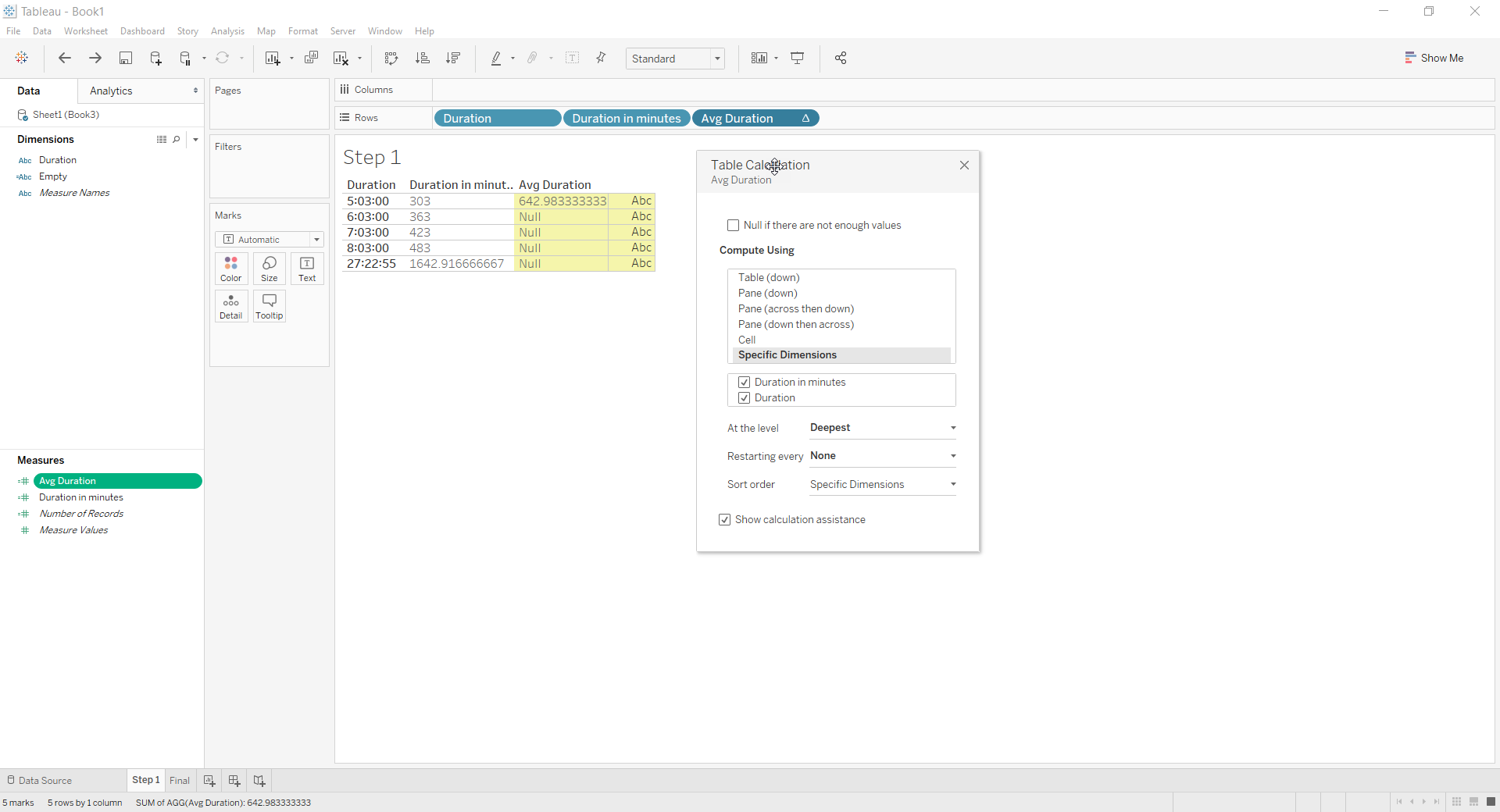
3. Use this as a dimension and Table calculations like Window_average and Window_sum.
Example to calculate the average of duration:
if
FIRST()==0 then
WINDOW_AVG(ATTR([Duration in minutes]))
end
Knowledge-artikelnummer
001456639
Löste denna artikel ditt problem?
Berätta för oss vad vi kan förbättra!
