Выбрать организацию
Conditionally Color Data Based On The Result Of The Trend Line
Дата публикации: Apr 30, 2025
Задача
How to conditionally color the marks based on the trend line?
e.g. color the points above the trend line.
Действия
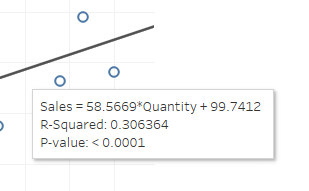
2. Create a calculation field Trend line, based on the equation above.
58.5669*sum([Quantity])+99.74123. Create a calculation field Above Trend line?
SUM([Sales])>[Trend line]4. Add Above Trend line? to Color, now the color of the plots will be separated in 2, but there will be 2 trend lines
5. Right click one of the trend lines and select Edit Trend Lines...
6. Uncheck the following factor AGG(Above Trend line?) from the Options
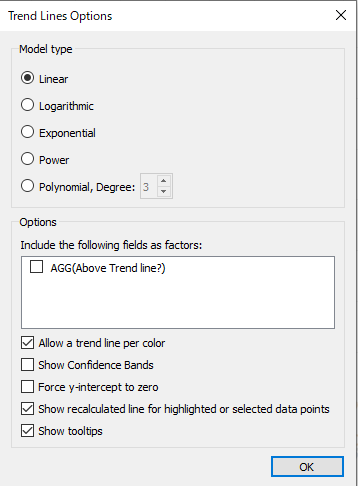
7. Change the color of Above Trend line?
Дополнительные ресурсы
Allow values of a trend line to be captured and used in calculations / further c
Номер статьи базы знаний
001456695
Эта статья решила вашу проблему?
Оставьте свой отзыв, чтобы мы могли стать лучше!
