Выбрать организацию
Enable Driver Logging for Amazon Athena Using a .properties File
Дата публикации: Nov 12, 2025
Задача
How to enable Amazon Athena driver logging to collect more information about a connection issue.
Действия
1. Create a file called "athena.properties" with the following text as an example:
jdbc:awsathena://AwsRegion=us-east-1;User=USER;Password=SecretAccessKey;S3OutputLocation=s3://aws-athena-query-results-665028136136-us-east-1/;LogLevel=5;LogPath=C:\\temp
2. Replace USER, SecretAccessKey, and the value after S3OutputLocation with the values necessary to connect. The above AwsRegion and S3OutputLocation are provided as an example of proper strings. Region is required at the end.
3. After creating the file, place the file in your "My Tableau Repository\Datasources" (or similar Tableau Prep) folder and then proceed with the standard clean logs gathering process and attempt to establish a new connection with Athena.
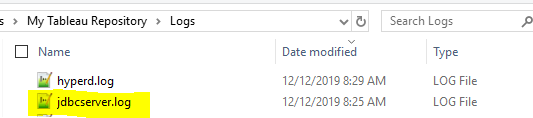
This should create a new "jdbcserver.log" file in the "My Tableau Repository\Logs" folder.
Номер статьи базы знаний
001456795
Эта статья решила вашу проблему?
Оставьте свой отзыв, чтобы мы могли стать лучше!
