Velg en organisasjon
Synchronize The Slider Label Of DATETRUNC Month Filter With Displayed Month To Axis
Publiseringsdato: Apr 13, 2024
Oppgave
When placing a continuous DATETRUNC field, such as year, month, to filter. The labels of the filter slider and the date displayed to the axis are not synchronized. How can I synchronize them?
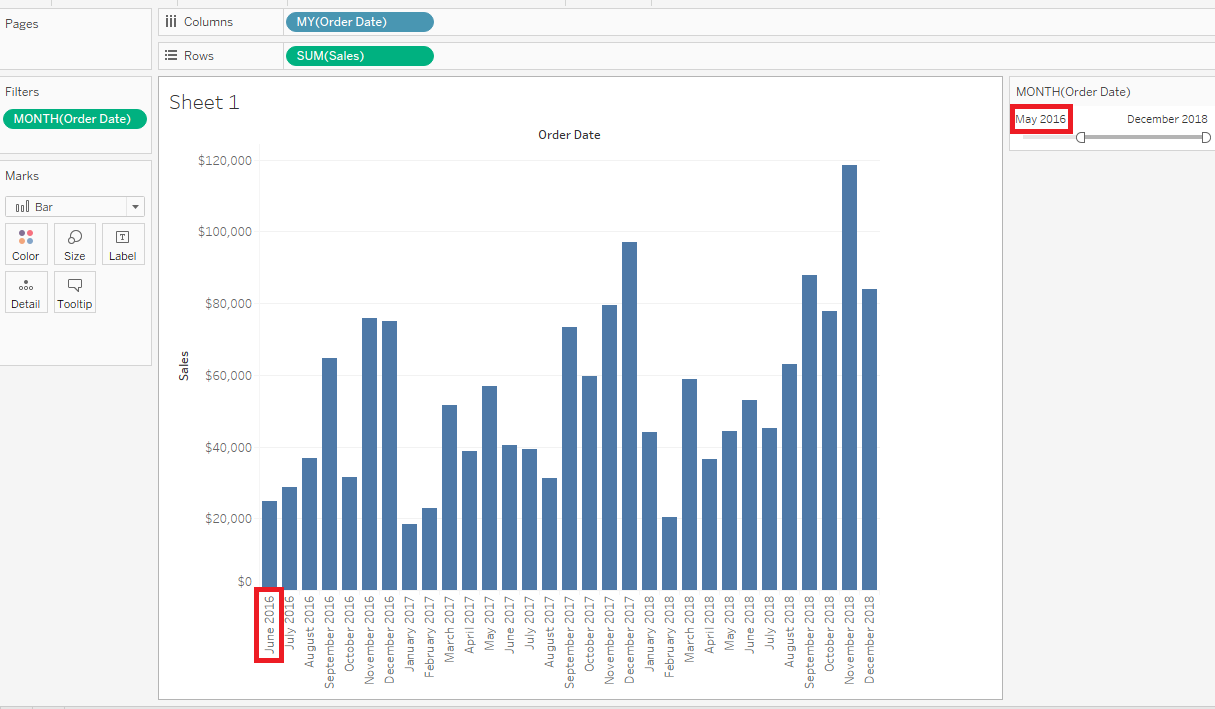
Trinn
- Right click the Sample - Superstore data source and click Duplicate.
- Click Data > Edit Relationships.
- Confirm the primary data source is Sample - Superstore and select Custom.
- Remove all other relationships except MY(Order Date) then click OK.
- Open the Sample - Superstore (copy) data source and right click Order Date > Default Properties > Date Format.
- Select Custom and set yyyy/mm.
- Open the Sample - Superstore data source and Place Order Date to columns and select MY(Order Date).
- Place Sales to rows.
- Open the Sample - Superstore (copy) data source and place Order Date to filter and right-click > Show Filter.
Knowledge-artikkelnummer
001456858
Hjalp denne artikkelen med å løse problemet ditt?
La oss få vite det slik at vi kan forbedre!
