조직 선택
How To Show Most Recent Label When There Are No Time Or Date Type Field In The View
게시 일자: Apr 29, 2025
과업
Label the most recent marks in the view. When there is a time or date field in the view, you can label all marks that correspond to the most recent date or time in the view. When you select this option, you can specify a scope for the labels in the view.
For a view without a time or date field, you can't select the Most recent label.
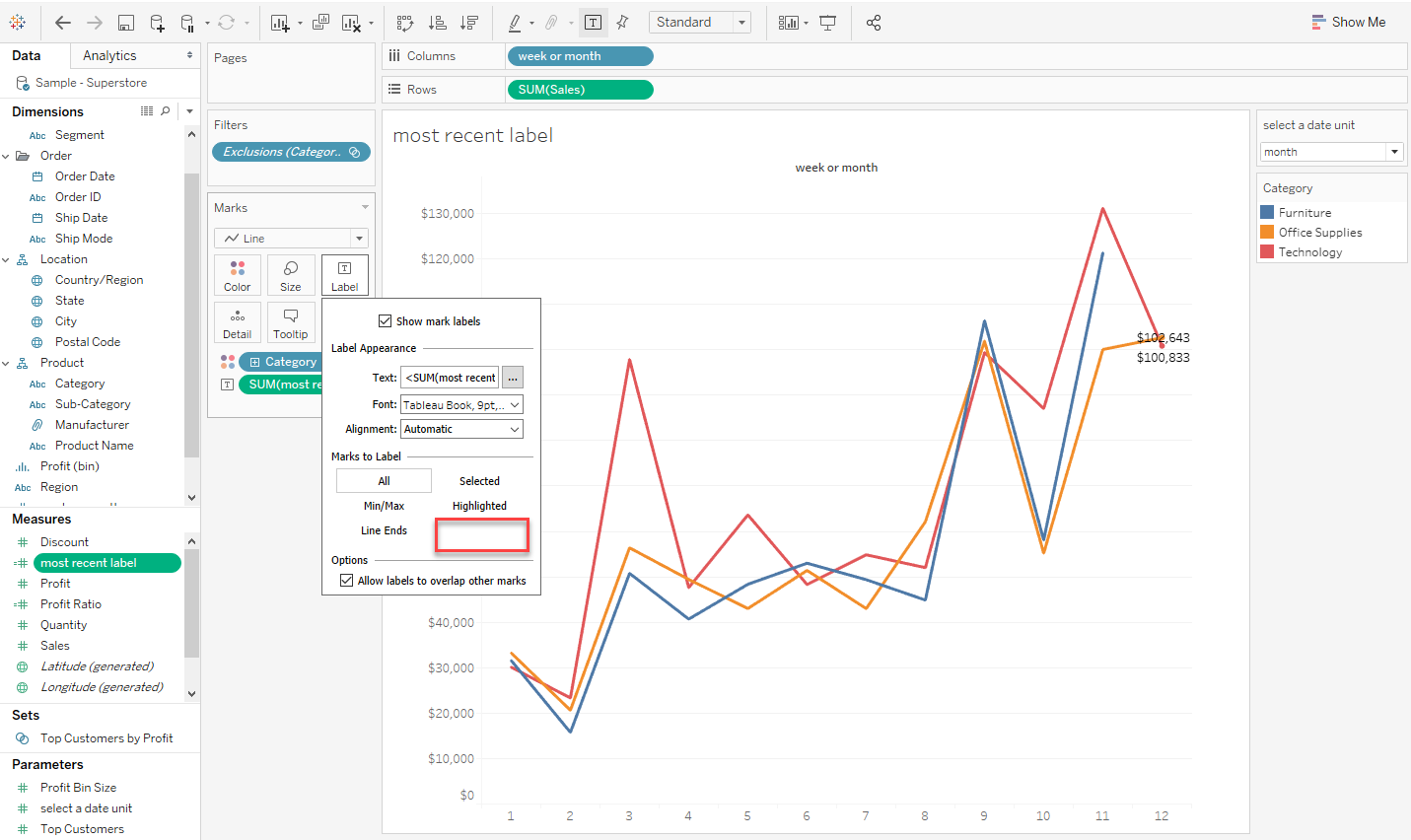
단계
- Create a parameter calls select a date unit
- Create a calculation field like below and name it week or month
if [select a date unit] = 1 then DATEPART('week',[Order Date]) ELSEif [select a date unit] = 2 then DATEPART('month',[Order Date]) END - Create a calculation field like below and name it most recent label
if [select a date unit] = 1 then if [week or month] = {fixed:max(DATEPART('week',[Order Date]))} then [Sales] END ELSEIF [select a date unit] = 2 then if [week or month] = {fixed:max(DATEPART('month',[Order Date]))} then [Sales] END END - Drag week or month to Columns, Sales to Rows, Category to Color, most recent label to Label
- Exclude the newest point of Furniture.
- Confirm Label for Furniture is no longer shown in the view.
Knowledge 기사 번호
001456868
이 기사를 통해 문제를 해결했습니까?
개선을 위한 의견을 보내주세요.
