Valitse organisaatio
Set an Alert for Low Disk Space in Tableau Cloud and Server Sites
Julkaisupäivä: Mar 27, 2025
Tehtävä
How to set an alert that notifies a site administrator that they are low on disk space when using Tableau Cloud or Tableau Server
Vaiheet
This feature is not currently built into the Tableau Cloud or Tableau Server Product.
Workaround for Tableau Server:
Tableau server administrators can use the Server Disk Space administrative view to see current disk space usage, then create an Email Alert with a Monitoring Script.
Workaround for Tableau Cloud:
Use Admin Insights data source to create custom views, then create data-driven alerts to notify running out of storage.
Steps:
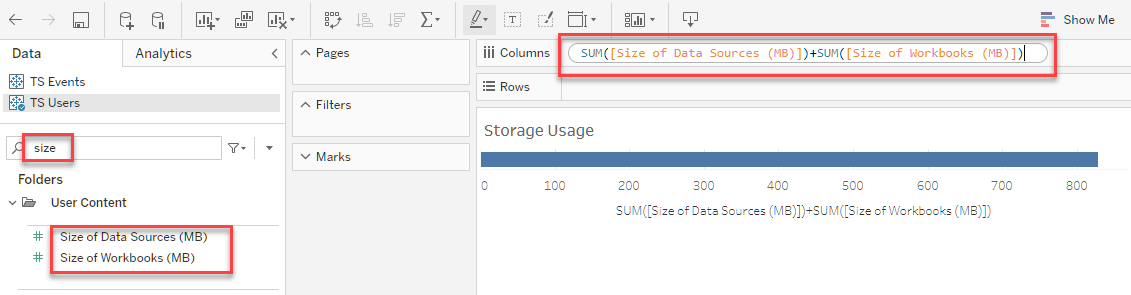
1. Create a custom view, search "size" for the measures [Size of Data Sources (MB)] and [Size of Workbooks (MB)], then plot the sum-up into the viz
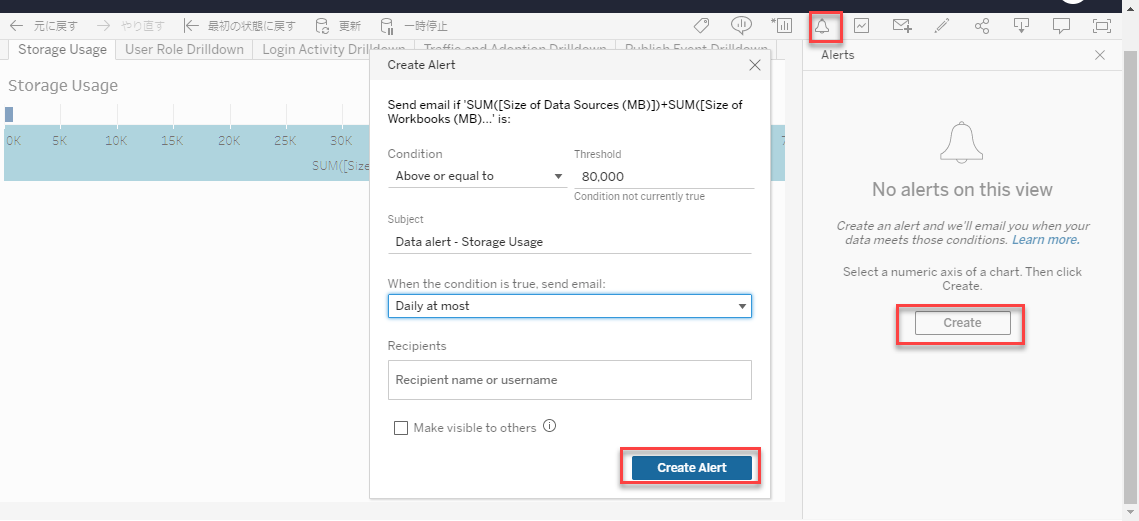
2. Create an alert for when the storage usage goes above a threshold. For the limit of storage capacity see Tableau Cloud Site Capacity.
Lisäresurssit
For more information about Admin Insights, see Manage Admin Insights.
Tableau Cloud Proactive Monitoring Alert: Site Storage Capacity
Knowledge-artikkelin numero
001456895
Ratkaisiko tämä artikkeli ongelmasi?
Anna palautetta, jotta voimme kehittyä!
