Valitse organisaatio
How to Show Missing Values as Zero in Step Line Graph
Julkaisupäivä: Apr 13, 2024
Tehtävä
How to show 0 in the step line graph when there is no data.
For example, for a series of data from 12/1 ~ 12/6 without data in 12/4 and 12/5, how to show 0 in the step line graph for 12/4 and 12/5.
Vaiheet
Option 1: Use a discrete Date field
- Drag the Date field into [Columns] and set it as discrete MDY.
- Right-click the Date date ad select [Show Missing Values] in the drop-down menu.
- Create a calculation field for showing 0 when there is no data as ZN(SUM([Value]))
- Drag the newly created value field to [Rows]
Option 2: Use a continuous Date field
-
Drag the Date field into [Columns] and set it as continuous Day.
-
Right-click the Date date ad select [Show Missing Values] in the drop-down menu.
-
Create a calculation field for showing 0 when there is no data as ZN(SUM([Value]))
-
Drag the newly created value field to [Rows]
-
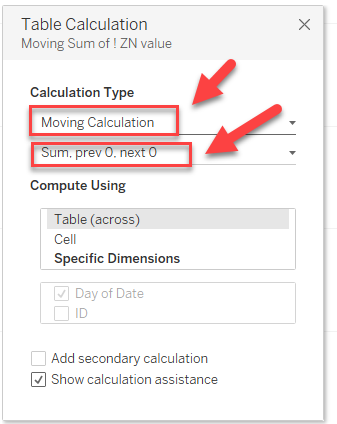
Right-click the value field and select [Edit Table Calculation]
-
Set the table calculation as below
Knowledge-artikkelin numero
001456907
Ratkaisiko tämä artikkeli ongelmasi?
Anna palautetta, jotta voimme kehittyä!
