Velg en organisasjon
Filter a Time Series Graph on a Two Month Unit (Or Three Week, etc)
Publiseringsdato: Feb 23, 2026
Oppgave
How to filter data and show the time series graph as a time unit such as two-month, three-week, etc.
Trinn
Two-Month Unit: DATE(DATETRUNC('month',[Order Date]))
Three-week Unit: DATE(DATETRUNC('week',[Order Date]))
2. Create a parameter to choose the start day.
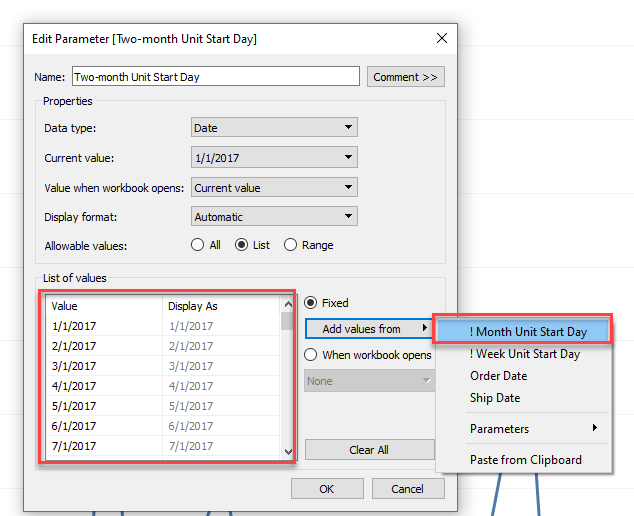
3. Create a TF calculation field to filter the time series data
Two-Month Unit: [Order Date]>=DATETRUNC('month',[Two-month Unit Start Day]) AND [Order Date]<DATEADD('month',2,DATETRUNC('month',[Two-month Unit Start Day]))
Three-week Unit: [Order Date]>=DATETRUNC('week',[Three-week Unit Start Day]) AND [Order Date]<DATEADD('week',3,DATETRUNC('week',[Three-week Unit Start Day]))
Flere ressurser
Knowledge-artikkelnummer
001456921
Hjalp denne artikkelen med å løse problemet ditt?
La oss få vite det slik at vi kan forbedre!
