Seleziona un'organizzazione
Sorting Stacked Bars by the Percentage of One Segment
Data pubblicazione: Feb 19, 2026
Operazione
How to sort the stacked bar graph by the percentage of one segment just like below.
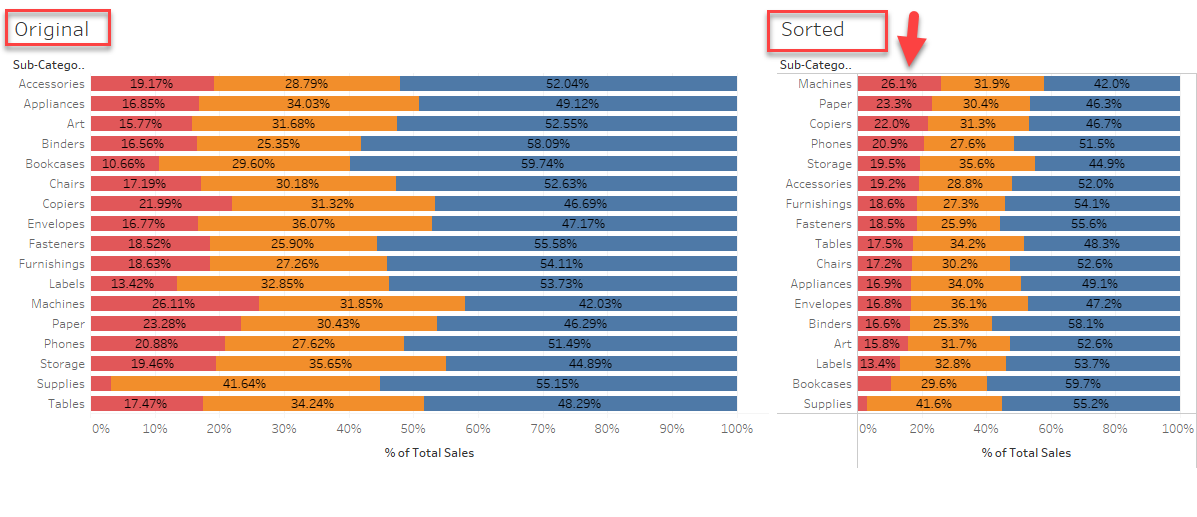
Fasi
1. Make a calculation like below to the percentage for 'Home Office'.
IF ATTR([Segment]) = "Home Office"
THEN SUM([Sales]) / TOTAL(SUM([Sales]))
ELSE 0
END
2. Add this field to [Columns] Shelf along with the original measure
3. Edit table calculation Compute Using > Cell to show the right percentage
4. Sort the view by the percentage calculation.
Risorse aggiuntive
Numero articolo Knowledge
001456922
Questo articolo ha risolto il problema?
Facci sapere, così possiamo migliorare!
