Выбрать организацию
Sorting Stacked Bars by the Percentage of One Segment
Дата публикации: Feb 19, 2026
Задача
How to sort the stacked bar graph by the percentage of one segment just like below.
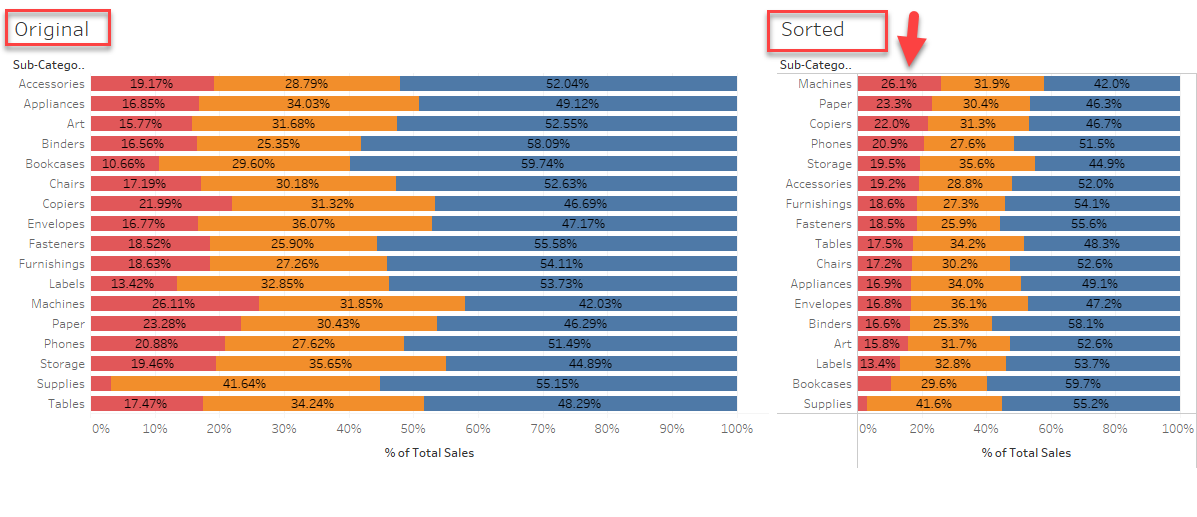
Действия
1. Make a calculation like below to the percentage for 'Home Office'.
IF ATTR([Segment]) = "Home Office"
THEN SUM([Sales]) / TOTAL(SUM([Sales]))
ELSE 0
END
2. Add this field to [Columns] Shelf along with the original measure
3. Edit table calculation Compute Using > Cell to show the right percentage
4. Sort the view by the percentage calculation.
Дополнительные ресурсы
Номер статьи базы знаний
001456922
Эта статья решила вашу проблему?
Оставьте свой отзыв, чтобы мы могли стать лучше!
