Välj en organisation
Sorting Stacked Bars by the Percentage of One Segment
Publiceringsdatum: Feb 19, 2026
Uppgift
How to sort the stacked bar graph by the percentage of one segment just like below.
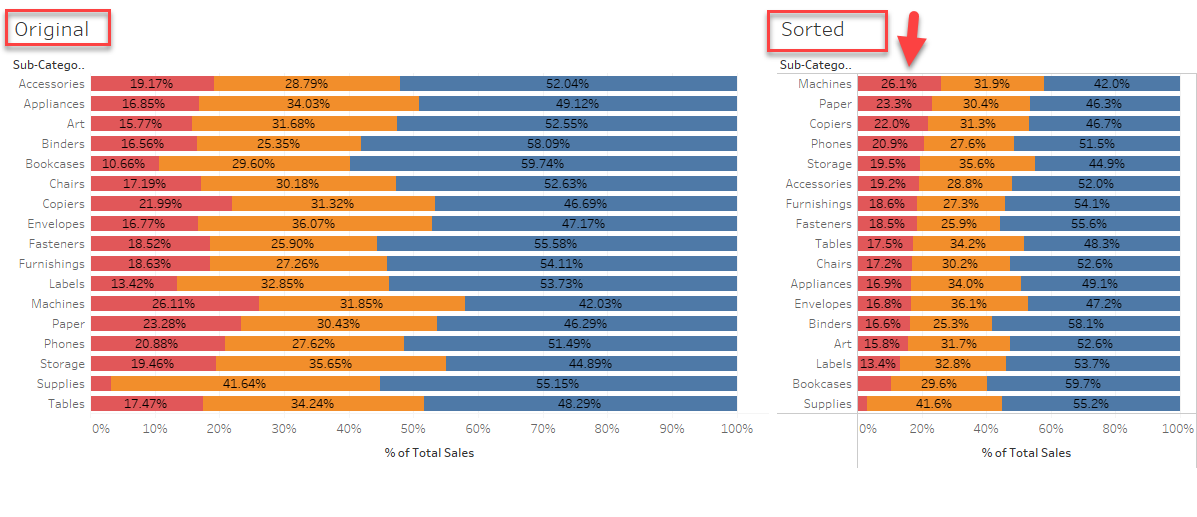
Steg
1. Make a calculation like below to the percentage for 'Home Office'.
IF ATTR([Segment]) = "Home Office"
THEN SUM([Sales]) / TOTAL(SUM([Sales]))
ELSE 0
END
2. Add this field to [Columns] Shelf along with the original measure
3. Edit table calculation Compute Using > Cell to show the right percentage
4. Sort the view by the percentage calculation.
Ytterligare resurser
Knowledge-artikelnummer
001456922
Löste denna artikel ditt problem?
Berätta för oss vad vi kan förbättra!
