Seleziona un'organizzazione
Hiding Grand Totals for only Some of the Columns in Tableau Desktop
Data pubblicazione: Apr 28, 2025
Operazione
Fasi
To reproduce this resolution, see the steps below:
- From Tableau Desktop, connect to the Superstore sample data source
- In a new Sheet, drag Segments to Rows, and Measure Names to Column
- Drag Measure Values to Text on the Marks Card
- Then select the Analysis top navigation menu > Totals > Show Columns Grand Totals
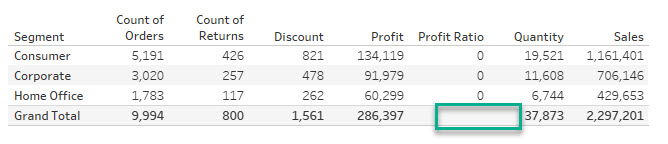
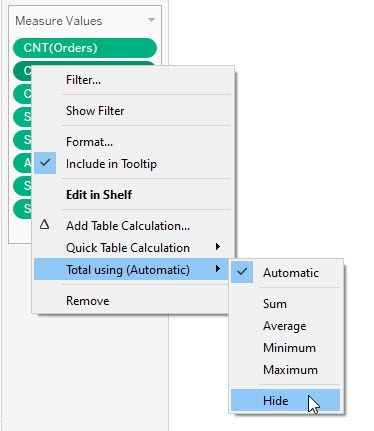
- To remove the Grand Total of Profit Ratio, right click on the Aggregated mark of this measure on the Measure Card (AGG(Profit Ratio)) and select Total using (Automatic) > Hide.
Risorse aggiuntive
Note: the video has no sound. To view the video in higher quality, click the YouTube icon below to watch it on YouTube directly.
Numero articolo Knowledge
001456978
Questo articolo ha risolto il problema?
Facci sapere, così possiamo migliorare!
