Vælg en organisation
How To Make Filter Actions Work For Measure Names Using Parameter
Udgivelsesdato: Apr 13, 2024
Opgave
Trin
- Build the Bar Chart
- Create a new worksheet Bar Chart
- Drag Order Date to Columns
- Drag Measure Names to Filters card, select Sales and Profit
- Drag Measure Values to Rows
- Drag Measure Names to the Color of Marks Card
- Change the chart type to Bar
- Build the Details crosstab
- Create a new worksheet Details
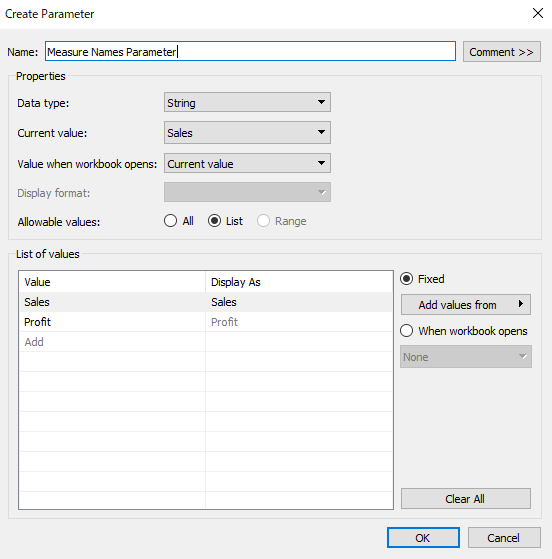
- Create a parameter Measure Names Parameter as the following:
- Create calculation field Selected Profit
if [Measure Names Parameter]="Profit"
then [Profit]
END
Create calculation field Selected Salesif [Measure Names Parameter]="Sales" then [Sales] END
- Drag Order Date to Columns
- Drag Measure Names to Filters card, select Selected Sales and Selected Profit
- Drag Measure Values to Text in Marks card
- Drag Measure Names Parameter, Category, Sub-Category to Rows
- Set up dashboard actions
- Create a dashboard, add Bar Chart and Details to the view
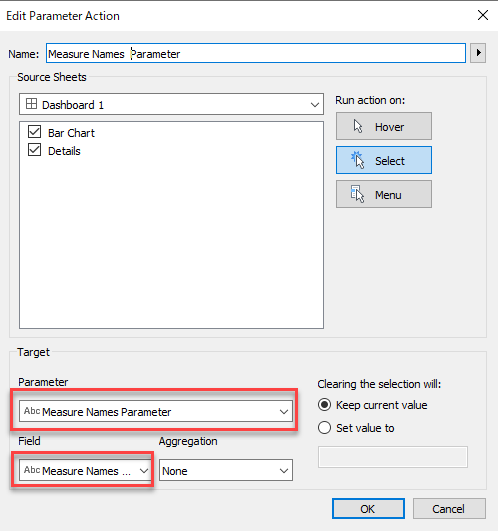
- Select from the menu bar, Dashboard>Actions...>Add Action>Change Parameter
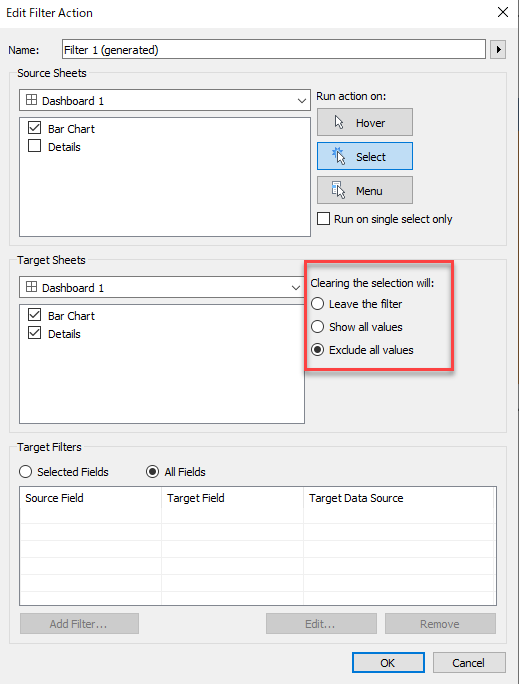
- Click the Use as Filter button
of the Bar Chart
- Edit the generated filter, change the Clearing the selection will: to Exclude all values
Yderligere ressourcer
Vidensartikelnummer
001456984
Løste denne artikel dit problem?
Giv os besked, så vi kan forbedre os!
