조직 선택
Finding the Top N Within a Category
게시 일자: Apr 30, 2025
과업
단계
Option 1: Use INDEX()
- Select Analysis > Create Calculated Field.
- Name the calculation (in this example, the calculation is named Index) enter the following formula, then click OK:
INDEX() - In the Measures pane, right-click Index and select Convert to Discrete.
- Place Index on Rows, between Region and Sub-Category.
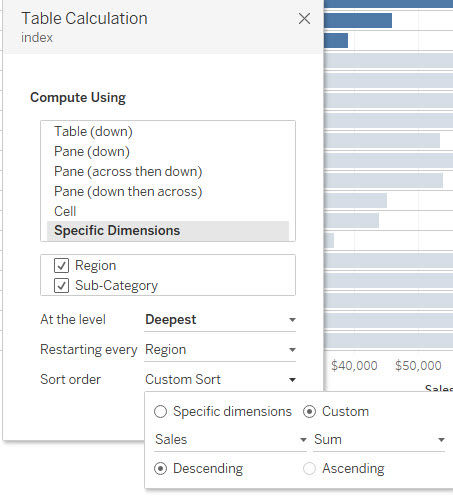
- Right-click Index on Rows and select Edit Table Calculation.
- Under Compute Using, select Specific Dimensions.
- Under Restarting Every, select Region.
- Under Sort Order, select Custom and enter the following options:
Sales Sum Descending
- Ctrl+Click Index on Rows and place it on Filters. Click OK.
- On the Filters shelf, right-click Index and select Continuous.
- In the Filter dialog box, type the range of values for your top N, then click OK.
Option 2: Use RANK()
Rather than INDEX, you can use the following calculation:RANK(SUM([Sales])) This calculation has the sort order built in, so you can skip the Sort Order step above when using this method.
추가 자원
To view these steps in action see the video below.
Note: video has no sound. (FULL Screen video)
Knowledge 기사 번호
001458007
이 기사를 통해 문제를 해결했습니까?
개선을 위한 의견을 보내주세요.
