Vælg en organisation
Conditionally Formatting Cell Background Color in Tableau
Udgivelsesdato: Feb 11, 2026
Opgave
In Tableau, learn how to format cell background color based on a KPI (key progress indicator).
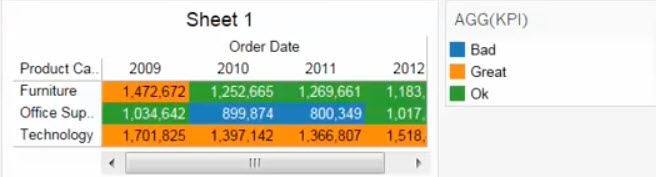
Trin
Review the following two examples to format the background cell color using a condition and KPI in Tableau.
Example 1: Conditionally formatting the cell background color of Measures only
This article expands on the steps for creating key progress indicators, adding information for formatting the cell background color based on the indicator value.
Step 1: Create a KPI
Create a KPI view using the steps provided in Visualize Key Progress Indicators.
You can also download the attached sample workbook to see the finished result.
Step 2: Set up conditional background color
- Drag the KPI field to Color on the Marks card.
- Change the mark type to Bar.
- (Optional) Click the arrow in the upper-right corner of the Color legend, select Edit Colors, and select the color palette you want.
- Drag Number of Records to Size on the Marks card.
- Click the arrow in the upper-right corner of SUM(Number of Records), select Measure (Sum) > Minimum
- Adjust mark size as desired. See Size Properties for more information.
- (Optional) Hide the Number of Records Card.
To view the steps showed in the below video, please expand the above section. Note: the video has no sound.
Example 2: Conditionally formatting the cell background color of Measures and/or Dimensions
Step 1: Create a "container" calculated field
- Select Analysis > Create Calculated Field.
- In the Calculated Field dialog box, do the following, and then click OK:
- Name the calculated field. In this example, the calculated field is named Container.
- In the Formula field, type
0
Step 2: Create the View
These directions will build the view one column at a time. After all of the columns are built, we will format all the columns at once. The original view had two dimensions on the Rows shelf, and two measures, so we will need to create 4 columns in this view.
- Create a new worksheet
- Drag [City] to the Rows shelf
- Right-click [City] on the Rows shelf and uncheck Show Header
- Drag two copies of [Container] onto the Columns shelf
Note: Tableau Desktop will show one marks card for each copy of container called: Sum(Container) and Sum(Container) (2). This step is necessary because if only one copy of [Container] is used to create each column, then the headers will be on the bottom of the view.
- Click on the first copy of SUM(Container) on the Columns shelf. This will automatically open the marks card for this copy of SUM(Container)
- For the marks card for SUM(Container), drag [City] onto Label. Now the first column in the view contains city names and the second column is still blank.
- Right-click the second copy of SUM(Container) on the Columns shelf and select Dual Axis.
- Repeat steps 2-7 for any dimensions on the Rows shelf in the original worksheet.
- Repeat steps 4-7 for every measure on the Measures Values card in the original worksheet.
Step 3: Conditionally Color the View
- If there are 6 or fewer copies of [Container] on the Columns shelf, then click on the marks card labeled "All" to select it
- If there are more than 6 copies of [Container], then at the bottom of the marks card, click "More Fields" and select "All"
- Drag the calculated field used to determine the color of the rows to Color
- In the dropdown menu, select Square
- Click Size and adjust the slider all the way to the right
- Create a calculated field with a name like "Blank" with a calculation similar to the following:
"" - Drag [Blank] to the Rows shelf
- Right-click [Blank] on the Rows shelf and uncheck Show Header
- (Optional) decrease the width of the columns if necessary so that the color completely fills the columns
Step 4: Rename the Headers
- For each bottom header, right-click the header "Container" and select Edit Axis
- In the Edit Axis dialog for the bottom axis, do the following and click OK:
- On the General tab, delete the title "Container"
- On the Tick Marks tab, select None for Major tick marks
- For each top header, right-click the header and then select Edit Axis
- In the Edit Axis dialog for the top axis, do the following and click OK:
- On the General tab, change the title "Container" to the desired title
- On the Tick Marks tab, select None for Major tick marks
Yderligere ressourcer
The above steps can be reviewed in the attached workbook Cell Background Color.twbx.
To voice your support for the inclusion of this feature in a future product release, add your vote to the following Salesforce Idea: Color entire row based on condition
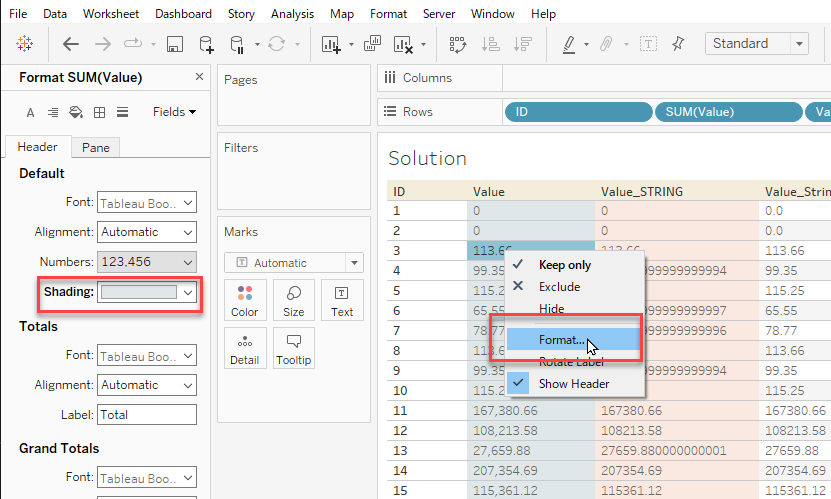
This article is specifically about conditionally formatting the cell background color. You can change the background color of the cell/field in general regardless of the values or the conditions from Format menue below. There is also a similar solution about changing the color of the texts conditionally.
Conditionally Color the Text in a Crosstab
Build a Heat Map
Vidensartikelnummer
001458130
Løste denne artikel dit problem?
Giv os besked, så vi kan forbedre os!
