Vælg en organisation
Avoiding Scroll Bars on a View in a Dashboard
Udgivelsesdato: Feb 21, 2025
Opgave
Trin
Option 1
Increase the width of the container for the view. Expanding the width of the container might prevent the horizontal scroll bar from appearing.Option 2
Configure the sheet to fit the entire view. This will scale the view to the size of the container and might prevent scroll bars from appearing.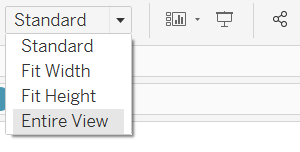
- Open the drop-down menu for the selected sheet and select Fit > Entire View.
Yderligere ressourcer
For text wrapping, please refer to the article below:
Text Wrapping for Long Strings in Text Tables
Size and Lay Out Your DashboardReview sizing and layout
Vidensartikelnummer
001458152
Løste denne artikel dit problem?
Giv os besked, så vi kan forbedre os!
