Velg en organisasjon
How to Use Python Scripts with Tableau Prep on Local Machine Without Tableau Server
Publiseringsdato: Apr 13, 2026
Oppgave
How to embed Python script in Tableau Prep Builder and run it on a local machine without using Tableau Server (without configuring TabPy server on Tableau Server).
Trinn
1. Download and install Python.
2. Download and install the Tableau Python server (TabPy).
- python -m pip install --upgrade pip
-
pip install tabpy
pip3 install pandas". You must use a pandas data frame in your scripts to integrate with Tableau Prep BuilderConfigure a connection:
After the preparation, to include Python scripts in your flow, you need to configure a connection between Tableau and a TabPy server.
1. Start the TabPy server with the default setting by running the command below from command prompt.
- tabpy
3. In the Select an Analytics Extension drop-down list, select Tableau Python (TabPy) Server.
4. Input the Server and the Port number like the below image. (Port 9004 is the default port for TabPy)
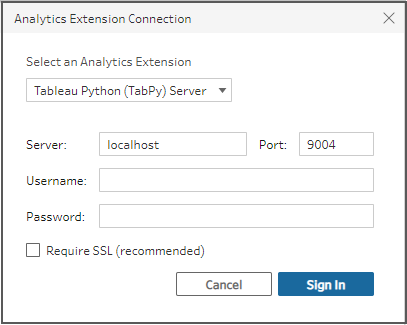
5. Test out the connection.
Add a script to your flow:
Follow the steps in Online help to add Python script in the flow.
Use Python scripts in your flow -- Add a script to your flow
Knowledge-artikkelnummer
001458342
Hjalp denne artikkelen med å løse problemet ditt?
La oss få vite det slik at vi kan forbedre!
