Выбрать организацию
Reset Parameters with a Single Click
Дата публикации: Feb 27, 2025
Задача
How to configure a dashboard so that all parameters can be reset to their default values with a single click
Действия
A control primarily for the setting of the default values of parameters used in a dashboard, to reset all parameters to their default settings, is currently not built into the product.
As a workaround, use a sheet as the reset button and configure parameter actions to set the parameters back to their default values. A sample packaged workbook and a video on Step 3 is available in the Attachments section of this article.
Workaround for clearing all parameter changes with one button
To reset the parameter action change at one click do the following:
1. Add a new worksheet [Reset]
(1) Create a calculation field [Reset(Label)]
"Reset"
(2) Create a calculation field [Reset Parameter]
""
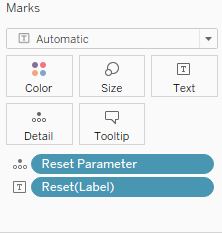
(3) Add a [Reset] field to the Text Marks card and add a [Reset Parameter] field to the Detail Marks card
2. Move to the Dashboard
(1) Add the [Reset] sheet to the dashboard
(2) On the menu bar click on [Dashboard] > [Actions]
(3) Click on [Add Actions Button] > [Change Parameter..]
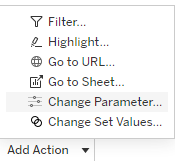
(4) Add a parameter actions like below and click on [OK] button to save the change.
Name: Reset Category Parameter
Source Sheets: Reset
Target Parameter: Category_Parameter
Source Field: Reset Parameter
Run action on: Select
(5) Click on [Add Actions Button] > [Change Parameter..] again
(6) Create a parameter action similar to step2-(4) to clear sub category parameter action and click OK button to save the changes.
Name: Reset Sub-Category Parameter
Source Sheets: Reset
Target Parameter: Sub-Category_Parameter
Source Field: Reset Parameter
Run action on: Select
3. Test the Solution
Click on Category and Sub-category to select the items on the dashboard and then click on the "Reset" button to clear the changes.
**Please refer to the Step3_verification.mp4 for step3.
Дополнительные ресурсы
The Community discussion, Action on Clear button to return a certain parameter, contains an example and a sample workbook.
Another example is discussed in the 'Map Overlays' section of Fun with Tableau 2019.2 Parameter Actions, and you can download the sample workbook from Tableau Public.
To voice your support for the inclusion of this enhancement in a future product release, add your vote to Reset Parameters - Set Default / Reset to Default / Clear Default.
Номер статьи базы знаний
001458377
Эта статья решила вашу проблему?
Оставьте свой отзыв, чтобы мы могли стать лучше!
