Valitse organisaatio
How to Calculate Percentage from the First Row
Julkaisupäivä: Apr 28, 2025
Tehtävä
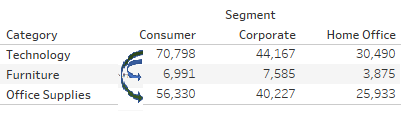
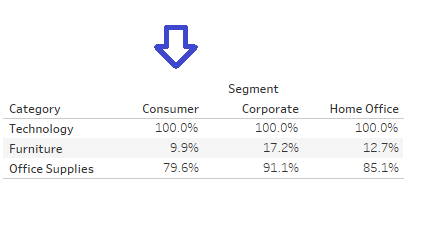
How to calculate percentage from the first row
eg
Vaiheet
1. Create a calculation field [Percentage from first row].
Formula:
LOOKUP(SUM([Profit]),0)
/
LOOKUP(SUM([Profit]),FIRST())
2. Add [Percentage from first row] to view.
3. Arrange the Tableau Calculation Direction by right click on [Percentage from first row] on text mark card > click on [Edit Table Calculation] > select [Table(Down)].
Lisäresurssit
※Please find sample workbook Percentage Sample.twbx - Sheet2 for more details
Knowledge-artikkelin numero
001458392
Ratkaisiko tämä artikkeli ongelmasi?
Anna palautetta, jotta voimme kehittyä!
