Sélectionner une organisation
How to Calculate Percentage from the First Row
Date de publication: Apr 28, 2025
Tâche
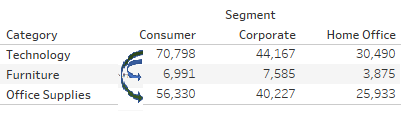
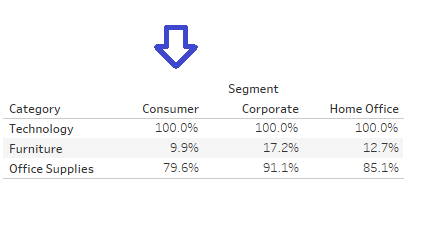
How to calculate percentage from the first row
eg
Étapes
1. Create a calculation field [Percentage from first row].
Formula:
LOOKUP(SUM([Profit]),0)
/
LOOKUP(SUM([Profit]),FIRST())
2. Add [Percentage from first row] to view.
3. Arrange the Tableau Calculation Direction by right click on [Percentage from first row] on text mark card > click on [Edit Table Calculation] > select [Table(Down)].
Ressources supplémentaires
※Please find sample workbook Percentage Sample.twbx - Sheet2 for more details
Numéro d’article de la base de connaissances
001458392
Cet article a-t-il résolu votre problème ?
Dites-nous ce que nous pouvons améliorer !
