Välj en organisation
How to Set SSL When Connecting to MySQL in Tableau Prep
Publiceringsdatum: Apr 13, 2024
Uppgift
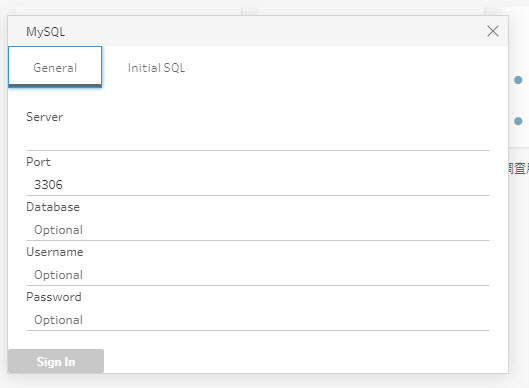
SSL checkbox did not appear in the login window in Tableau Prep.
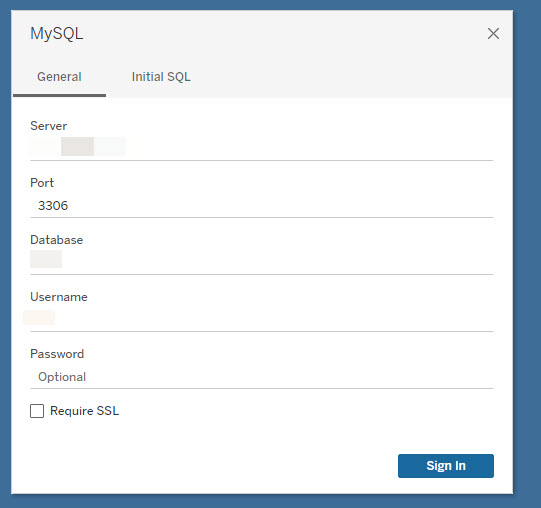
However, the "Require SSL" option appears in Tableau Desktop.
Steg
SSL is not supported in Tableau Prep.
Consider the possible workaround: Use an xml TDC file to set SSL.
The steps are as follows:
1. Close Tableau Prep, create a text file with the following contents, and rename the file to "mysql.tdc". (Bolded parts need to be changed).
Note1: The "version" is the version of the MySQL driver installed on your terminal.
Note2: The "value" is the SSL information you need to add.
========
<?xml version='1.0' encoding='utf-8' ?>
<connection-customization class='mysql' enabled='true' version='8.0.27'>
<vendor name='mysql' />
<driver name='mysql' />
<customizations>
<customization name='odbc-connect-string-extras' value='SSLKEY={C:\MySQL_SSL\client-key.pem};SSLCERT={C:\MySQL_SSL\client-cert.pem};SSLCA={C:\MySQL_SSL\ca-cert.pem}' />
</customizations>
</connection-customization>
========
2. Move "mysql.tdc" to "C:\ Users\<UserName>\Documents\My Tableau Prep Repository\Datasources".
3. Open Tableau Prep and connect to MySQL.
Note: Tableau does not test or support .tdc files.
Ytterligare resurser
- According to Considerations when using built-in connectors, "When using a MySQL-based connector, the default behavior is that the connection is secure when SSL is enabled."
- Using a .tdc file with Tableau Prep
- Unable to Browse to SSL Certificate in Tableau Prep
Knowledge-artikelnummer
001458399
Löste denna artikel ditt problem?
Berätta för oss vad vi kan förbättra!
