Sélectionner une organisation
How To Color The Map According To The Category With The Most Sales
Date de publication: Apr 13, 2024
Tâche
How to color the map according to the category with the most sales in it.
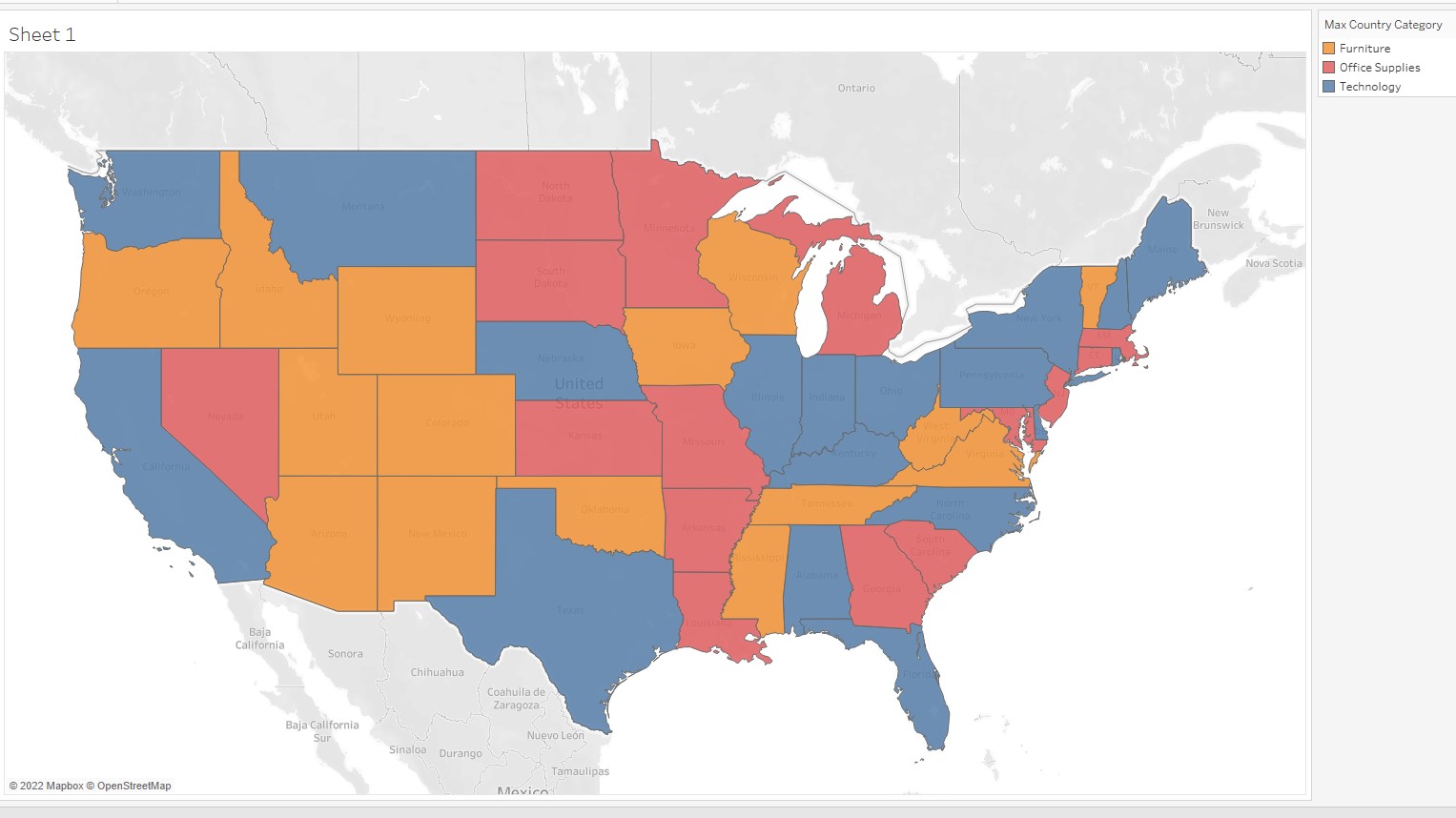
Étapes
1. Connect to Sample - Superstore.
2. Drag and drop [Longitude (generated)] to Columns.
Drag and drop [Latitude (generated)] to Rows.
3. Create Calculated Fields as following.
Field Name : Max Country-Category Sales
Calculation : { FIXED [State] : MAX(
{ FIXED [State],[Category]:SUM([Sales]) }
)}
4. Create Calculated Fields as following.
Field Name : Country-Category Sales
Calculation : { FIXED [State],[Category]:SUM([Sales]) }
5. Create Calculated Fields as following.
Field Name : Max Country Category
Calculation : { FIXED [State] : MAX(
IF [Country-Category Sales]=[Max Country-Category Sales]
THEN [Category]
END
)}
6. Drag and drop [Max Country Category] to Color.
7. Drag and drop [State] to Detail.
Numéro d’article de la base de connaissances
001458408
Cet article a-t-il résolu votre problème ?
Dites-nous ce que nous pouvons améliorer !
