Valitse organisaatio
How to move Row Grant Totals column from right to the middle of the table
Julkaisupäivä: Apr 13, 2024
Tehtävä
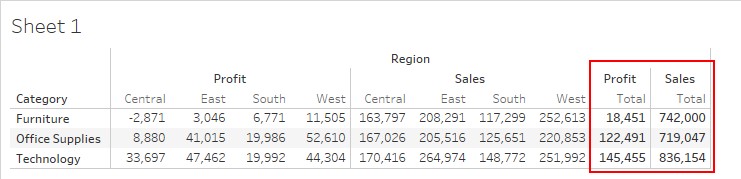
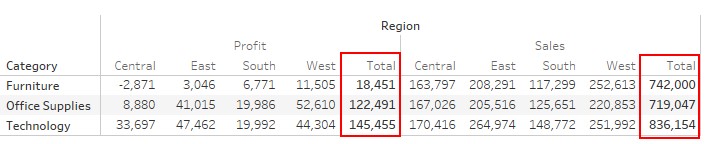
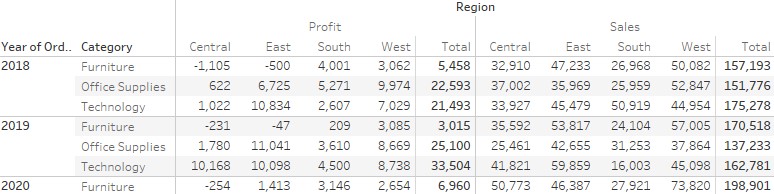
How to move Row Grant Totals column from right end of the table to the middle.
Before:
After:
Vaiheet
1. Connect to Sample-Superstore
2. Drag [Category] to Rows.
3. Drag [Sales] to table.
4. Drag [Profit] to table.
5. Drag [Region] to Columns.
6. Click "Analysis" on the toolbar. > Totals > Show Row Grant Totals
*Now the total should appear on the right side of the table.
-Move Row Grant Totals to inside of table from right-
7. Double click on Columns and type "" in the space was shown.

8. Move [""] to the leftmost Columns.

9. Click "Analysis" on the toolbar. > Totals > Add All Subtotals.
10. Right click [""] > Show Header
11. Click on Grand Total in the table and > Remove
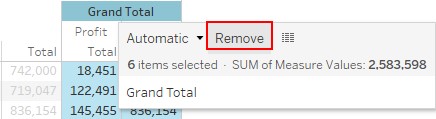
*Now the total should be displayed inside of the table.
Lisäresurssit
*If multiple fields are placed on the row shelf, the column totals should also be displayed.
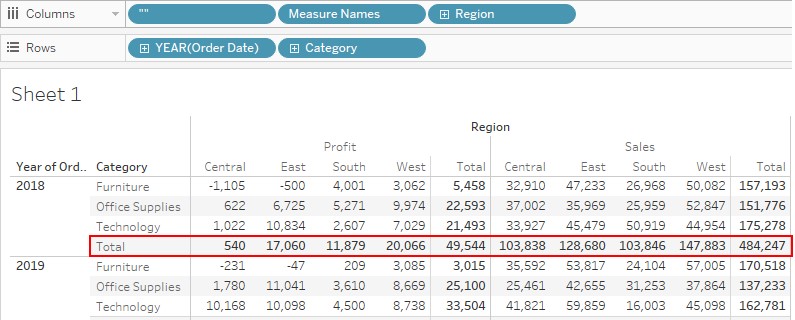
If you wish to hide column totals, please follow the steps below.
12. Right-click on the left-most field in the row shelf > Click on Subtotals.
*Make sure the column totals have disappeared.
Knowledge-artikkelin numero
001458443
Ratkaisiko tämä artikkeli ongelmasi?
Anna palautetta, jotta voimme kehittyä!
