Выбрать организацию
How to Change the Word "(All)" on the Top of the Filter to Other Words
Дата публикации: May 17, 2024
Задача
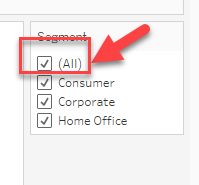
How to change the word "(All)" on the top of the filter to other words.
Please check the image below.
Действия
The ability to change the "(All)" word on the top of the filter to other words, is not currently built into Tableau Desktop.
The workaround described below and available in the sample packaged workbook is using a parameter as a filter.
The steps are as follows:
1. Make a filter like the below image which adds an "All Items" selection.
2. Create a calculation field as a filter.
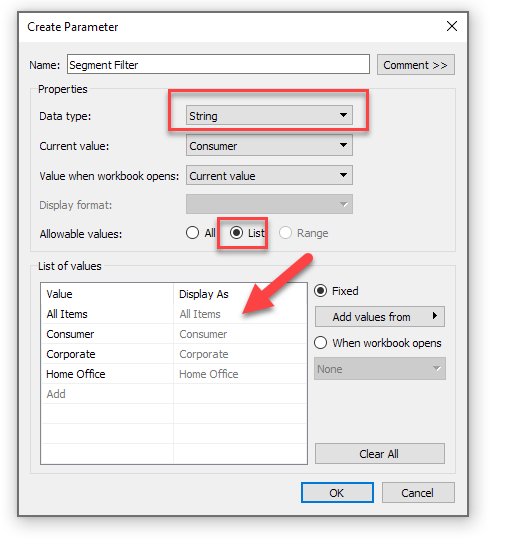
[Segment]=[Segment Filter] OR [Segment Filter]="All Items"
3. Add this calculation to [Filters] shelf and set the "True" value.
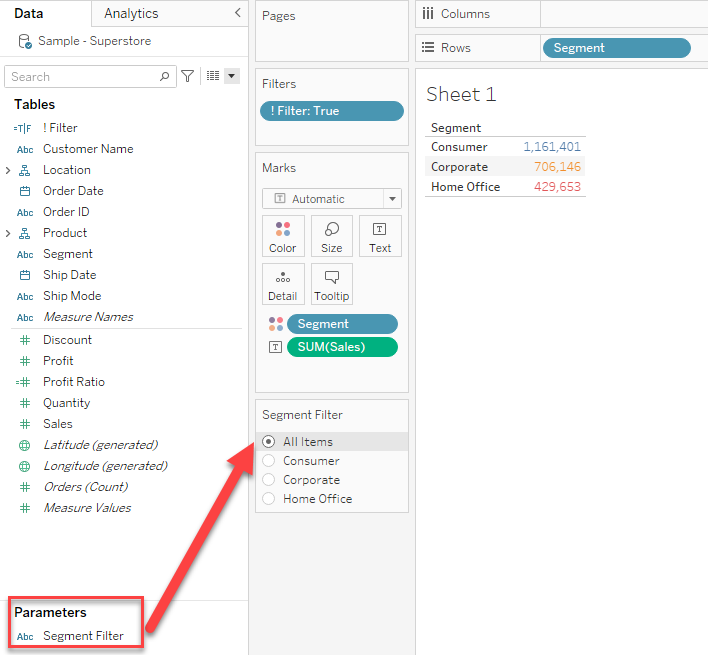
4. Right-click the parameter in Step1 and select "Show Parameter".
Now the "(All)" word can be replaced by any word you want like the below image.
Limitation of the above workaround:
Only one value can be selected in a parameter, so if you wish to specify multiple items, you will need to set them up in advance in parameters items and filter formulas.
Example: Add the item "Consumer and Corporate" in the parameter.
Дополнительные ресурсы
Номер статьи базы знаний
001458476
Эта статья решила вашу проблему?
Оставьте свой отзыв, чтобы мы могли стать лучше!
