Välj en organisation
How to Avoid Showing [Migrated Data] as Data Source Name in Tableau Desktop
Publiceringsdatum: Mar 23, 2026
Uppgift
How to avoid showing [Migrated Data] as the data source name in Tableau Desktop?
It should be the table name of the data source instead of [Migrated Data]. (for example: [Orders] or [Sample - Superstore])
Steg
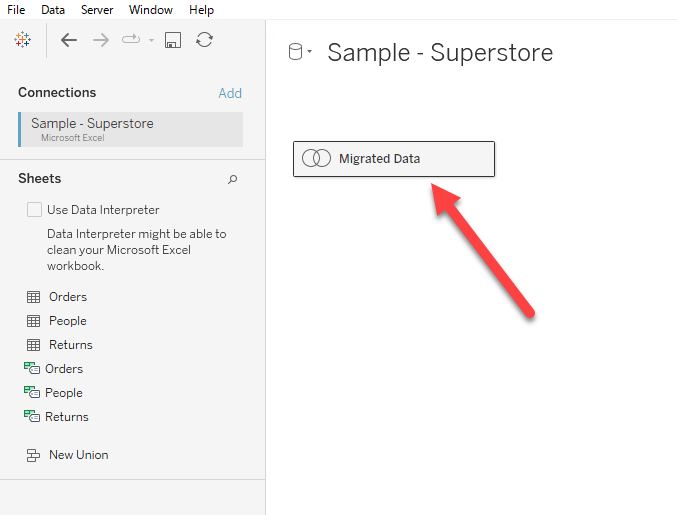
However, the single logical table is displayed with the name "Migrated Data" by default in Tableau version 2020.2 and later.
There are two possible workarounds.
Option 1
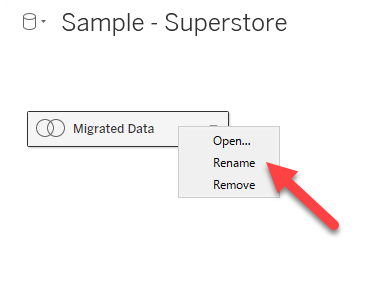
Right-click and rename the Migrated Data table.
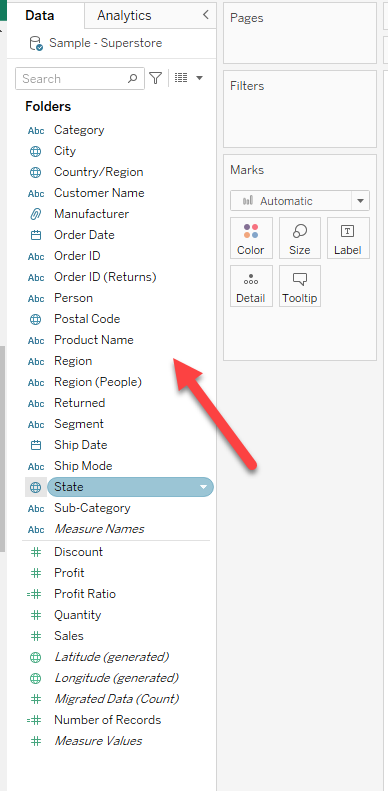
Disadvantage: When multiple tables are merged (JOIN), the fields are not categorized by the table in the data source pane on the left side.
Please refer to the figure below.
Option 2
Create the same data source in Tableau Desktop 2020.2 or later version and replace the data source.
[Replace Data Sources]
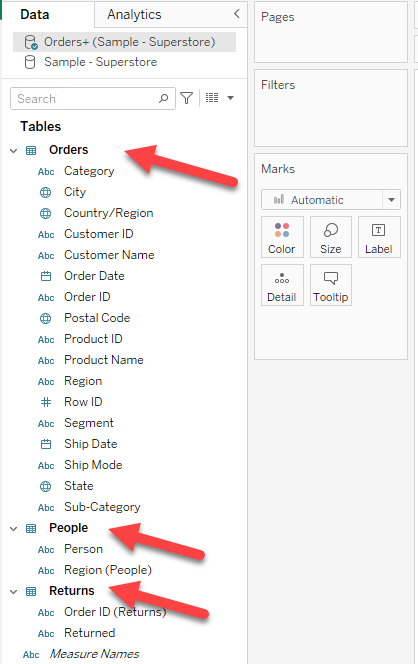
Advantage: the fields are categorized by the tables in the Data Sources pane on the left side of the worksheet.
See the figure below.
Ytterligare resurser
[What happens to my older data sources when I open them in Tableau version 2020.2 and later?]
Knowledge-artikelnummer
001458508
Löste denna artikel ditt problem?
Berätta för oss vad vi kan förbättra!
