조직 선택
Sort Records Based on This Year's and Previous Year's Sales
게시 일자: Apr 23, 2026
과업
How to sort records based on this year's and previous year's sales.
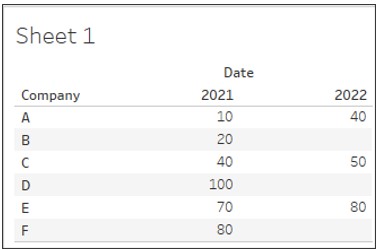
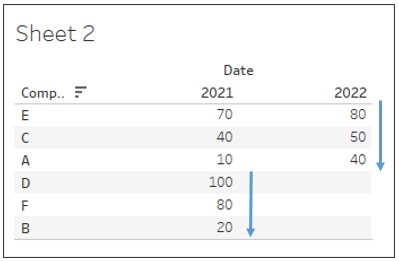
If you want to sort the records based on this year's sales, or if there are no sales this year, based on the previous year's sales.
Current behavior
Desired behavior
단계
2. Drag Date to Columns and Company to Rows.
3. Drag Sales to the view as show below.
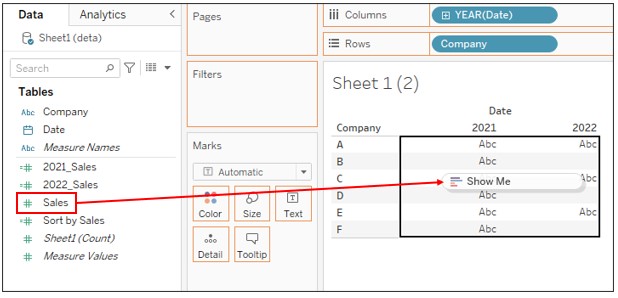
4. Create a new calculated field as follows:
Name : Previous Year Sales
Calculation : {FIXED [Company]:SUM(
IF DATEPART('year', [Date]) = YEAR(TODAY()) - 1
THEN [Sales] END)}
5. Create a new calculated field as follows:
Name : This Year Sales
Calculation : {FIXED [Company]:SUM(
IF DATEPART('year', [Date]) = YEAR(TODAY())
THEN [Sales] END)}
6. Create a new calculated field as follows:
Name : Sort by Sales
Calculation : IF [This Year Sales] >= 1
THEN [This Year Sales] * 1000000000000
ELSE [Previous Year Sales]
END
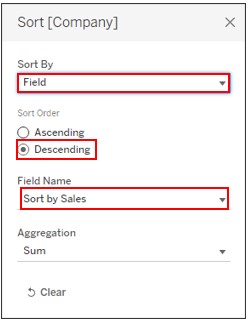
7. Right-click on Company on Rows and select Sort.
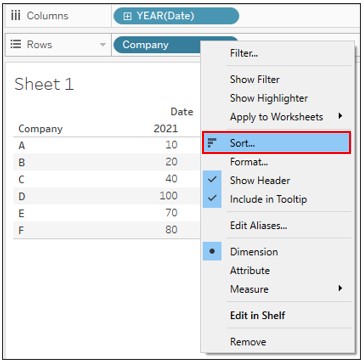
8. Set the sort as follows:
Knowledge 기사 번호
001458544
이 기사를 통해 문제를 해결했습니까?
개선을 위한 의견을 보내주세요.
