Välj en organisation
How to aggregate the second and third purchase amounts based on the first purchase date
Publiceringsdatum: Apr 29, 2025
Uppgift
How to aggregate the second and third purchase amounts based on the first purchase date.
Fixed on each customer on their first purchase date, and calculate the total grand of the second and third purchase amounts.
For example: A and B both buy on 2022/4,the date column 2022/4 will only count A and B, for the 2nd time to buy: A on 2022/5, B on 2022/5, so the total times are 2. the 3rd time of A is on 2022/7 and B does not buy the 3rd time, so the 3rd time is count 1 only, etc.
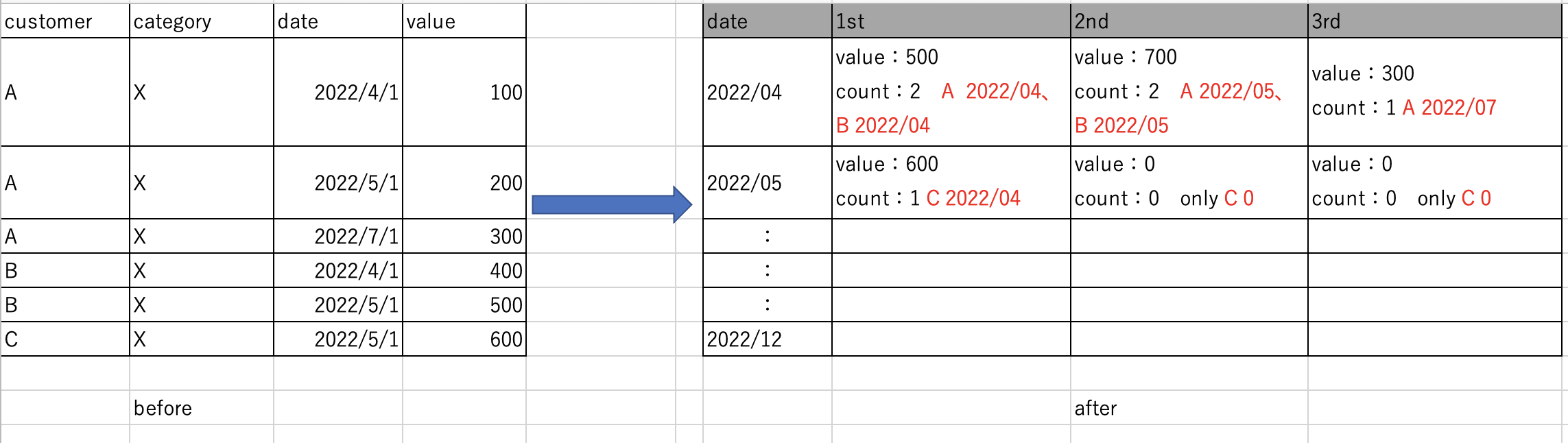
Steg
{FIXED [customer],[category] : MIN([date])}
2. Create a calculated field and name it 2nd purchase date:
{ FIXED [customer],[category] : MIN( IF [date] > [1st] THEN [date] END ) }
3. Create a calculated field and name it 3rd purchase date:
{ FIXED [customer],[category] : MIN( IF [date] > [2nd] THEN [date] END ) }
4. Create a calculated field and name it 1st purchase amounts:
IF [date]=[1st] THEN
{FIXED [customer],[category] : MIN( IF [1st] = [date] THEN [value] END ) }
END
5. Create a calculated field and name it 2nd purchase amounts:
IF [date]=[1st] THEN
{FIXED [customer],[category] : MIN( IF [2nd] = [date] THEN [value] END ) }
END
6. Create a calculated field and name it 3rd purchase amounts:
IF [date]=[1st] THEN
{FIXED [customer],[category] : MIN( IF [3rd] = [date] THEN [value] END ) }
END
7. drag [date] to row and measure name to column.
8. aggregate measures by count and sum.
see the attachment below.
Knowledge-artikelnummer
001458633
Löste denna artikel ditt problem?
Berätta för oss vad vi kan förbättra!
