Seleziona un'organizzazione
How to Display the Data Label in a Vertical Format by Characters
Data pubblicazione: Apr 24, 2025
Operazione
How to display the data label as vertical by characters? (This question is specific to Japanese, Chinese, Korean, etc.)
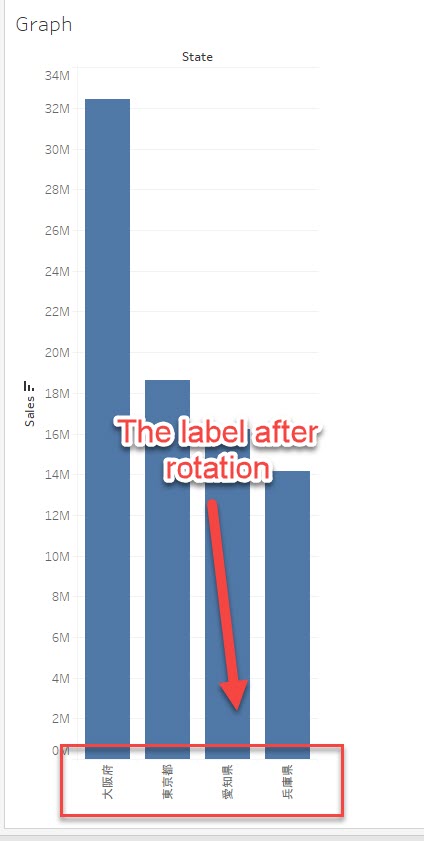
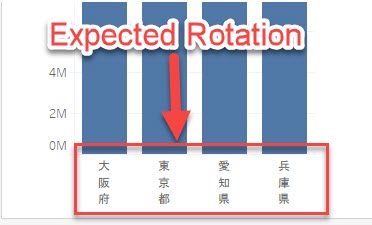
For example, when you rotate the label, it is displayed vertically with every character rotated 90 degrees to the left.
However, how to display the data label vertically with each character in the original angle as in the below image?
Fasi
Please consider the following workaround.
Create a calculated field for the label and enter a "line break" after each character using the [Enter] key.
Please refer to the below sample calculation.
CASE [State]
WHEN "大阪府" THEN "大
阪
府"
WHEN "東京都" THEN "東
京
都"
WHEN "愛知県" THEN "愛
知
県"
WHEN "兵庫県" THEN "兵
庫
県"
END
Note: if you have a large number of data in the label dimension, you will need to enter each label name manually, which is quite time-consuming.
The result:
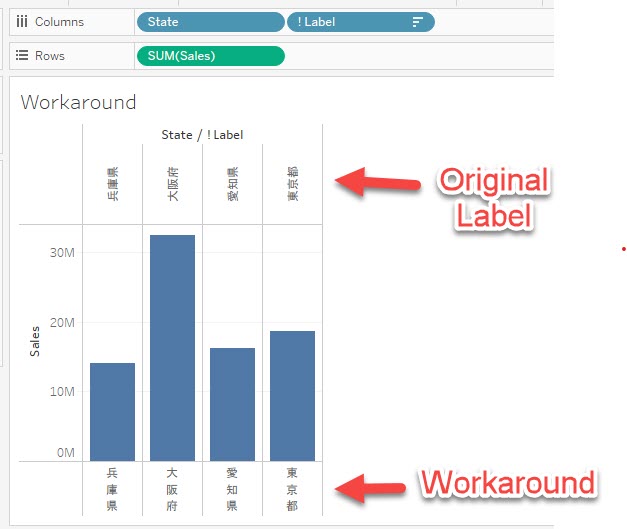
Please also check the attached workbook for detail.
Risorse aggiuntive
Please vote on the idea:
Display Data Label Vertically by Characters:
https://www.community.tableau.com/s/idea/0878b000000MxkvAAC/detail
Numero articolo Knowledge
001458665
Questo articolo ha risolto il problema?
Facci sapere, così possiamo migliorare!
