Velg en organisasjon
How to Display Cumulative Values in Subtotals
Publiseringsdato: Mar 14, 2025
Oppgave
How to display cumulative values in subtotals.
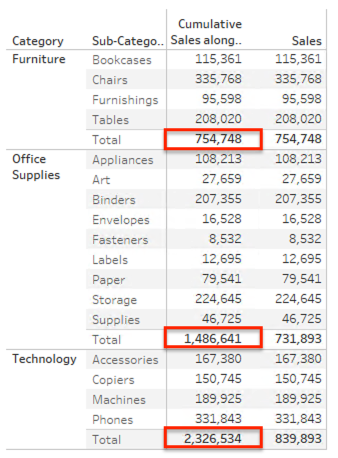
Trinn
1. Create a calculated field and name it Cumulative Sales.
IF SIZE() > 1 THEN RUNNING_SUM(SUM([Sales]))
ELSE SUM([Sales])
END
2. Add Category to Rows.
3. Add Sub-Category to Rows.
4. Add Measure Names to Filters and only select Sales and Cumulative Sales.
5. Add Measure Names to Columns.
6. Add Measure Values to Text.
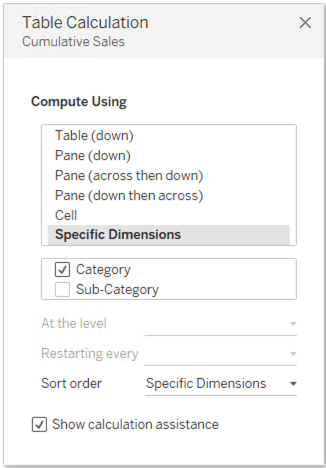
7. Right-click Cumulative Sales in Measure Values Shelf and select Edit Table Calculation. Set it as follows:
Flere ressurser
Customizing Totals to Show Different Values Than Table
Knowledge-artikkelnummer
001458682
Hjalp denne artikkelen med å løse problemet ditt?
La oss få vite det slik at vi kan forbedre!
