Valitse organisaatio
OneDrive Connector Has Been Retired and "OneDrive and SharePoint Online" Connector Was Added
Julkaisupäivä: Apr 13, 2024
Tehtävä
How to use the OneDrive connector when it has been deprecated in 2022.2?
Tableau Desktop 2022.2
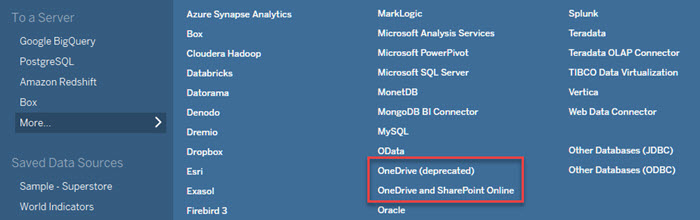
Tableau Cloud (2022.2)
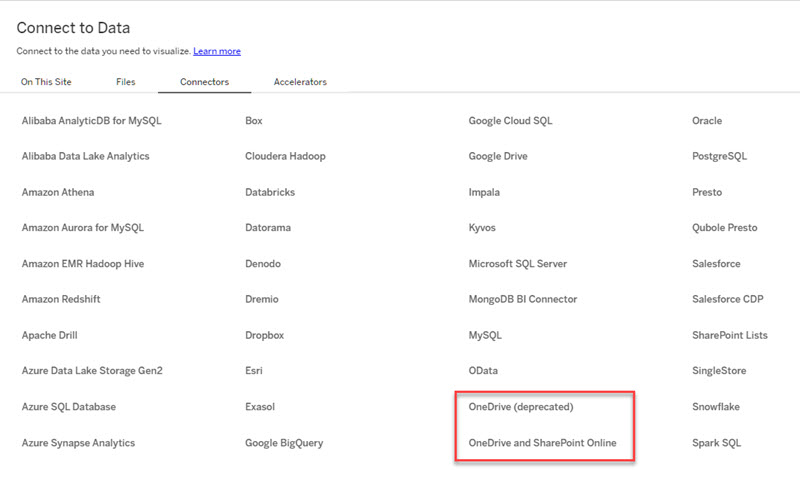
Vaiheet
The OneDrive connector has been replaced by the "OneDrive and SharePoint Online" connector. Please use the new connector when creating a new workbook or data source and update workbooks and data sources to use the new connector.
The original OneDrive connector only allowed access to a user's own files. Now, with the new connector OneDrive and SharePoint Online, the following abilities become available:
- Share files with other users who are allowed to access.
- Access to files in the SharePoint Online document library.
If receiving an error in 2023.2+ with existing workbooks, data sources, and flows failing to connect or refresh and the following error message occurs:
"Tableau doesn't recognize the data source type 'cloudfile:onedrive-excel-direct'. It might not be available in this version of Tableau, or it might be a connector plugin that's not installed on this system.", see the Tableau KB article here.
Lisäresurssit
Related ideas are listed below:
OneDrive Connector; Support Shared files with Prompt Authentication [RELEASED]
MS Office 365 (SharePoint, OneDrive, Azure) Connectivity [RELEASED]
Note: The new OneDrive and SharePoint Online connector will be available on Tableau Server with the 2022.3 release. As a result, datasources cannot be published from a newer major version of Tableau Desktop (2022.2) to an older version of Tableau Server (2022.1). Please see this knowledge article for more details.
MS Office 365 (SharePoint, OneDrive, Azure) Connectivity [RELEASED]
Note: The new OneDrive and SharePoint Online connector will be available on Tableau Server with the 2022.3 release. As a result, datasources cannot be published from a newer major version of Tableau Desktop (2022.2) to an older version of Tableau Server (2022.1). Please see this knowledge article for more details.
For additional information about the permissions required by the OneDrive and SharePoint Online connector, please refer to the third-party links below*.
Microsoft Graph permissions reference - Delegated permissions
*Although we make every effort to ensure links to external websites are accurate, up to date, and relevant, Tableau cannot take responsibility for the accuracy or freshness of pages maintained by external providers. Contact the external site for answers to questions regarding its content.
Microsoft Graph permissions reference - Delegated permissions
*Although we make every effort to ensure links to external websites are accurate, up to date, and relevant, Tableau cannot take responsibility for the accuracy or freshness of pages maintained by external providers. Contact the external site for answers to questions regarding its content.
Knowledge-artikkelin numero
001458704
Ratkaisiko tämä artikkeli ongelmasi?
Anna palautetta, jotta voimme kehittyä!
