Выбрать организацию
How to Replace Comma/Space With Line Break in Tableau Desktop
Дата публикации: Feb 26, 2026
Задача
How to separate the data by replacing comma/space with line breaks?
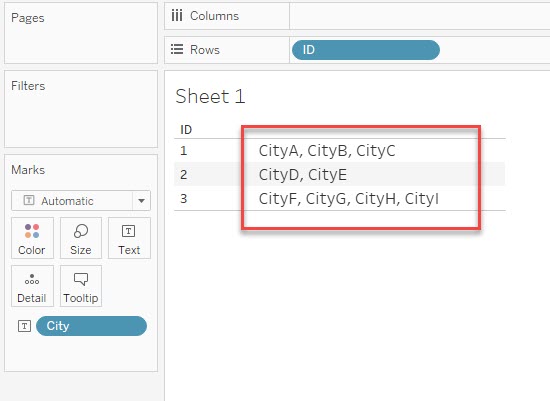
For example, in the below data, the dimension [City] has multiple values in a cell. How to show them with a line break instead all the items in a line?
Действия
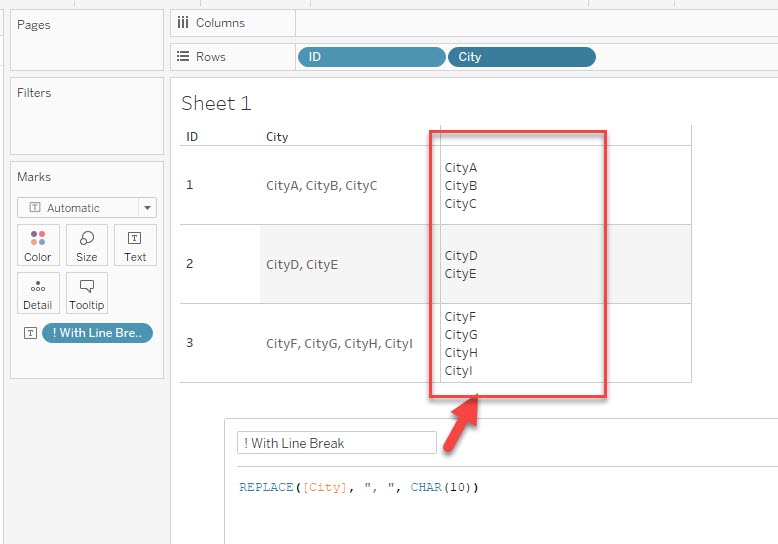
Please use the REPLACE() function to replace the comma/space with a line break in the dimension.
The sample calculation is as below.
Replace comma: REPLACE([Dimension], ",", CHAR(10))
Replace space: REPLACE([Dimension], " ", CHAR(10))
The results are like the below image.
Дополнительные ресурсы
[ASCII Table]
Номер статьи базы знаний
001458740
Эта статья решила вашу проблему?
Оставьте свой отзыв, чтобы мы могли стать лучше!
