Seleziona un'organizzazione
How to Filter Running Total Results And Grand Total Using Year And Month Parameters
Data pubblicazione: Apr 13, 2024
Operazione
How to filter running total results and grand total using year and month parameters in cross-tab.
Fasi
1.Create a parameter as follows and name it Year.
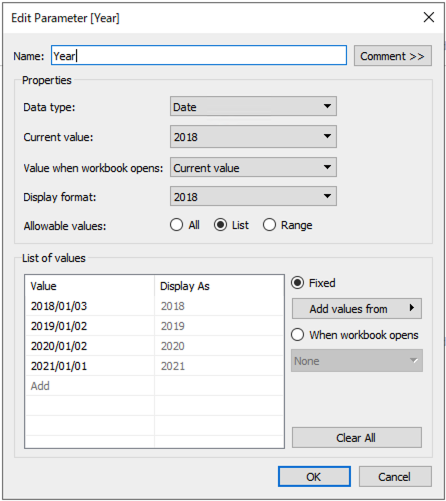
2.Create a parameter as follows and name it Month.
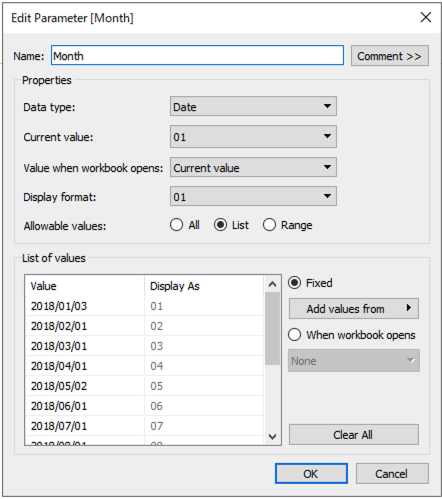
3.Right click the Year parameter and click Show Parameter.
4.Right click the Month parameter and click Show Parameter.
5.Create a calculated field and name it Running Total Sales.
RUNNING_SUM(SUM([Sales]))6.Create a calculated field and name it Running Total Sales (Filtered).
IF FIRST() = 0
THEN
  WINDOW_SUM(
    IF LOOKUP(ATTR(DATEPART('year',[Order Date])),0) = DATEPART('year',[Year]) AND
       LOOKUP(ATTR(DATEPART('month',[Order Date])),0) = DATEPART('month',[Month])
    THEN
       [Running Total Sales]
    END)
END
7.Right click Order Date and click Duplicate.8.Place Category to rows.
9.Place discrete YEAR(Order Date) to columns.
10.Place discrete MONTH(Order Date) to columns.
11.Place Region to columns.
12.Place discrete YEAR(Order Date (copy)) to Detail on the Marks card.
13.Place discrete MONTH(Order Date (copy)) to Detail on the Marks card.
14.Place Running Total Sales to Label on the Marks card.
15.Right click the Running Total Sales on the Marks card and click Edit Table Calculation.
16.Change the setting as follows.
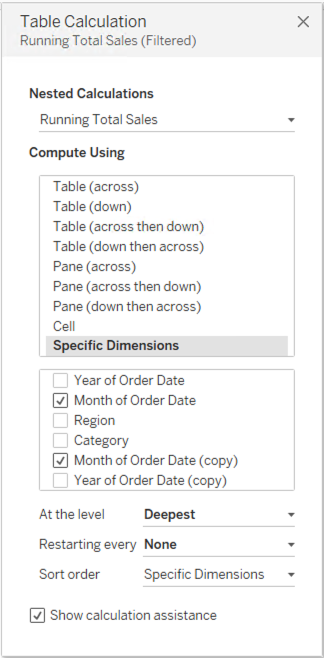
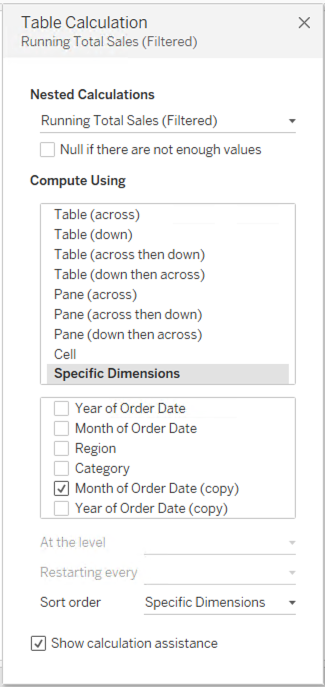
17.Create a calculated field and name it Filter.
LOOKUP(ATTR(DATEPART('year',[Order Date])),0) = DATEPART('year',[Year]) AND
LOOKUP(ATTR(DATEPART('month',[Order Date])),0) = DATEPART('month',[Month])
18.Place Filter to Filters card and only check True.19.Click Analysis > Totals > Show Row Grand Total.
20.Click Analysis > Totals > Row Totals to Left.
21.Click Analysis > Stack Marks > Off.
Numero articolo Knowledge
001458747
Questo articolo ha risolto il problema?
Facci sapere, così possiamo migliorare!
